Samsung Galaxy Tab Privacy Screen Guide (S and A Series)
Last updated: October 2026
Quick answer: A Galaxy Tab privacy screen guard is a thin film cut to your exact tablet model that darkens the screen for people sitting to your left and right while you still see it clearly from the front. Choose the guard by exact model name (for example Tab S10 FE, S9 FE, A9+ or S6 Lite 2024), not just by screen size, and expect a slightly dimmer screen and some extra care with the S Pen and biometrics.
Customers often ask us whether a privacy guard for an Android tablet is any different from one for a laptop. The idea is the same, but tablets are held in more positions, used with a pen, and often signed into with a fingerprint or face. This guide covers what changes on a Samsung tablet and how to get the fit right the first time.
How does a privacy screen guard work on a Galaxy Tab?
A privacy filter is a film with tiny vertical slats inside it, called micro-louvers. Think of them as very fine window blinds. Light from the screen travels straight out through the gaps toward you, but light heading off to the sides is blocked. Beyond roughly 30 degrees on each side, the screen looks dark or close to black.
Our tablet guards use two-way privacy (blocks left and right views). That suits the most common situations where someone glances across at your tablet: a seat next to you on a train, a colleague beside you in a meeting, or a classmate at the next desk.
The film also has a matte surface, which diffuses reflections from lights and windows, and it adds a layer of protection against everyday scratches on the glass.
Which Galaxy Tab models need which guard?
Samsung uses several different screen shapes across its S and A series. Two tablets can share almost the same diagonal and still need different films, because the aspect ratio, corner radius and camera position differ. That is why we cut tablet guards per model rather than per size.
The table below shows the approximate visible screen size for some popular Galaxy Tab models. We calculated width and height from the diagonal and aspect ratio, so treat them as a reference, not a cutting template.
| Galaxy Tab model | Screen diagonal | Aspect ratio | Approx. screen width x height |
|---|---|---|---|
| Galaxy Tab S10 FE | 10.9 inch | 16:10 | 235 x 147 mm |
| Galaxy Tab S9 FE | 10.9 inch | 16:10 | 235 x 147 mm |
| Galaxy Tab A9+ | 11 inch | 16:10 | 237 x 148 mm |
| Galaxy Tab S6 Lite (2024) | 10.4 inch | 5:3 | 227 x 136 mm |
| Galaxy Tab S10+ | 12.4 inch | 16:10 | 267 x 167 mm |
| Galaxy Tab S10 FE+ | 13.1 inch | 16:10 | 282 x 176 mm |
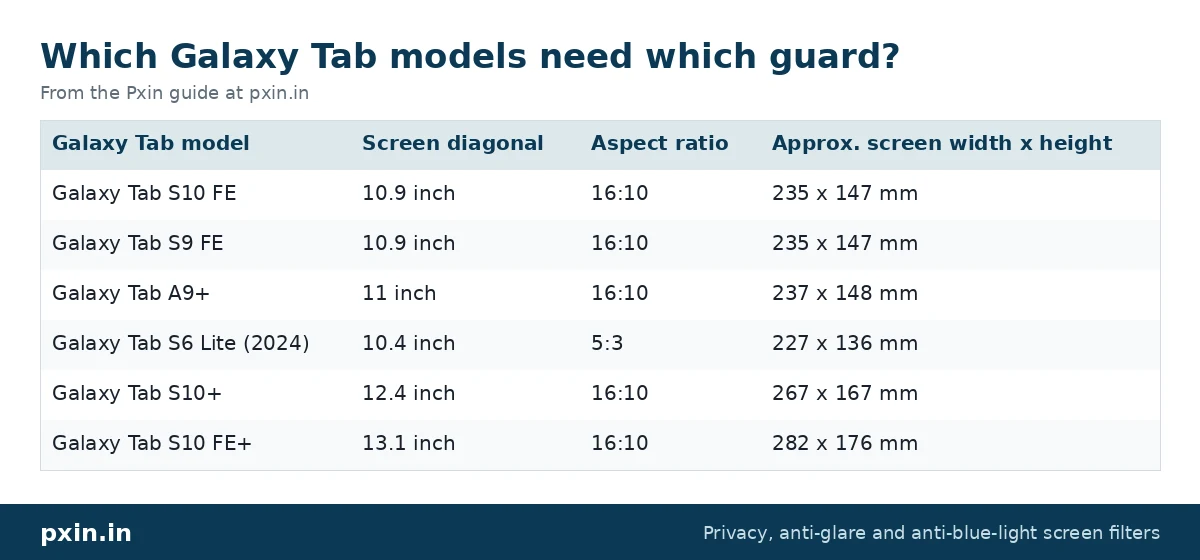
Notice that the S10 FE and S9 FE have the same screen size on paper. Even so, always match the guard to the exact model name printed in your settings, since small changes in bezel and camera placement can move the cutouts.
To find your exact model, open Settings, then About tablet. The model name and model number (it starts with SM-) are listed there. The same number is printed on the box.
Pxin makes guards for the Galaxy Tab S10 FE privacy screen guard, the Galaxy Tab A9+ privacy screen guard and other Samsung models listed in our Samsung tablet privacy screen guards range.
Will the S Pen and touch still work with a privacy screen?
For most people, yes. Capacitive touch reads your finger through a thin film, and many users notice no change at all. The S Pen also works through a film, though the feel changes: the matte surface has more grip than bare glass, which some people like for writing and others find slower for quick sketching.
If taps start to feel missed, Samsung offers a setting meant for screen protectors. Go to Settings, then Display, then Touch sensitivity, and turn it on. Samsung mentions this setting in its own support note on privacy screens for the Galaxy Tab S10.
A few tips that help with pen use:
- Keep the film clean. Fine dust under the S Pen tip shows up more on a matte surface than on glass.
- Replace a worn S Pen nib sooner. A matte film can wear nibs a little faster than glass.
- Lower palm pressure. If you rest your hand on the screen, palm rejection still works, but press lightly when you start writing.
What about fingerprint and face recognition?
This is the area where you should set expectations before you buy. Samsung states that its own privacy screen and paper-feel screen products do not support biometric features, and it suggests removing them when you want to use those features.
How much this matters depends on your tablet. Several FE and A series models read fingerprints through the side key, so a front film does not cover the sensor at all. Higher-end S series tablets that read your fingerprint through the display are more affected, because the film sits between your finger and the sensor. Face recognition uses the front camera, and a darkened view or a film edge near the camera can make it less reliable.
A simple workaround is to use a PIN or pattern as your main screen lock on a tablet with a privacy guard. It is also more secure in a public place, where someone glancing at your face or finger is less of a concern than someone reading your messages.
Galaxy Tab privacy screen guard in portrait vs sideways use
Two-way privacy works along one axis. When you hold the tablet sideways, as most people do for video, typing or split screen, the guard blocks the people on your left and right. When you rotate the tablet upright to read, the same louvers now block views from above and below instead, and someone sitting beside you may see more.
If you mostly read upright in public, tilt the tablet slightly toward you or sit with your back to a wall. If most of your public use is sideways with a keyboard cover, two-way privacy fits that pattern well.
How to install a privacy guard on a Samsung tablet
Installing a film on a tablet is a little fussier than on a laptop because the guard covers the whole glass. Our tablet privacy screen installation guide walks through each step with photos. In short:
- Wash and dry your hands, then clean the screen with the wipe in the pack.
- Use the dust sticker to lift any specks you can see against a light.
- Line up the camera cutout and edges before peeling the backing.
- Peel slowly from one end and press the film down with a card, working outward.
- Push any small bubbles to the edge. Tiny ones usually settle within a day.
Do it in a room with the fan switched off, since moving air carries dust onto the screen.
The honest trade-offs
A privacy guard always makes the screen a little dimmer, because the louvers block some light even straight on. Most people raise brightness a step or two, which uses slightly more battery. Colours can also look a touch less vivid, and the matte texture adds a faint grain on white backgrounds.
And like every privacy filter, it does not help against someone standing directly behind you. They look at the screen from the same angle you do, so they see what you see.
Frequently asked questions
Does a Galaxy Tab privacy screen guard stop the fingerprint sensor working?
On tablets that read fingerprints through the display, a privacy film can stop the sensor from working, and Samsung says biometrics are not supported with its own privacy screens. On models with a fingerprint reader in the side key, the front film does not cover the sensor.
Can I use the S Pen with a privacy screen guard?
Yes, the S Pen writes through a privacy film. The surface feels more textured than glass, and if touch feels less responsive, turn on Settings, Display, Touch sensitivity.
Is a Tab S9 FE privacy guard the same as one for the Tab S10 FE?
Both have 10.9 inch 16:10 screens, so they look alike. We still recommend choosing the guard listed for your exact model, because cutouts and edges can differ between generations.
Does the privacy guard work when I hold the tablet upright?
The guard gives two-way privacy (blocks left and right views) in the direction it was made for. When you rotate the tablet, the blocked direction rotates too, so side viewers may see more in the other orientation.
Can I remove a privacy screen guard from my tablet later?
Yes. Lift one corner with a fingernail and peel slowly at a low angle. A film that has been removed usually will not stick down as cleanly a second time.
Find the right filter
If you are comparing tablets, our iPad privacy screen guard guide covers the same questions for Apple tablets, and 360 vs 2-way privacy screens explains how the blocked directions differ between filter types. When you know your exact model number, browse the Samsung tablet privacy screen guards and pick the one listed for your Galaxy Tab.