360 Degree Privacy Screen vs 2-Way: What's the Difference?
Last updated: October 2026
Quick answer: A two-way privacy screen darkens your display for anyone sitting to your left or right, while a 360 privacy screen also darkens it for people looking down from above or up from below. If your risk is mostly a person in the next seat, two-way is usually enough. If people stand behind you, walk past your desk or look over the seat back, a 360 filter covers those extra angles.
Customers often ask us whether 360 is simply the "stronger" version of a privacy screen. It is not quite that. The two types use the same basic idea but aim it in different directions, and each one has its own trade-offs. This guide explains the 360 vs 2 way privacy screen choice in plain words so you can match the filter to your seat, your desk and your device.
How a privacy screen works in the first place
A privacy filter is a thin film with very fine slats built into it, called micro-louvers. Think of them as tiny window blinds. Light from your screen passes straight through the gaps towards your eyes, but light leaving at a steep angle hits the slats and gets blocked. The result is a clear picture for you and a dark screen for anyone viewing from an angle.
The viewing angle is the range in which the screen still looks normal. On a typical privacy filter, the side view starts going dark beyond roughly 30 degrees on each side. Inside that range you see your work. Outside it, the screen looks dim or black.
The difference between the two types comes down to which way those slats run.
What is a 2-way privacy screen?
In a two-way privacy screen, the micro-louvers run in one direction only, so they block light going left and right. Someone in the next chair, the next seat on a train or the next desk in an open office sees a dark panel. A person looking from above or below, while standing roughly in line with you, still sees a fairly normal image.
Two-way filters are the most common type for laptops and monitors. They suit most everyday situations because most prying eyes are beside you, not above you. Our standard laptop privacy screen guard range is built this way.
What is a 360 degree privacy screen?
A 360 privacy screen, sometimes called a four-way privacy filter, controls light in both directions. It darkens the screen from the left and right, and also from above and below. A colleague standing behind your chair and looking down at the screen, or someone walking past a low desk, gets a much darker view than they would with a two-way filter.
You can see the full set of sizes in our 360 laptop privacy screen category. These are applied directly to the screen, so it is worth reading the 360 laptop privacy installation guide before you start.
360 vs 2 way privacy screen: side-by-side comparison
| Feature | Two-way privacy screen | 360 privacy screen |
|---|---|---|
| Blocks views from left and right | Yes | Yes |
| Blocks views from above and below | No | Yes |
| Person directly behind you, at your eye level | Can still see | Can still see |
| How the screen looks to you | Slightly dimmer than without a filter | Usually a little dimmer again, and more sensitive to head position |
| Sitting posture | Fairly forgiving up and down | You need to look at the screen more squarely |
| Typical places it suits | Home, cafe, the seat next to you on a train | Open offices, reception desks, aisle seats, standing crowds |
| Lid angle on a laptop | Not critical | Worth adjusting so you face the screen straight on |
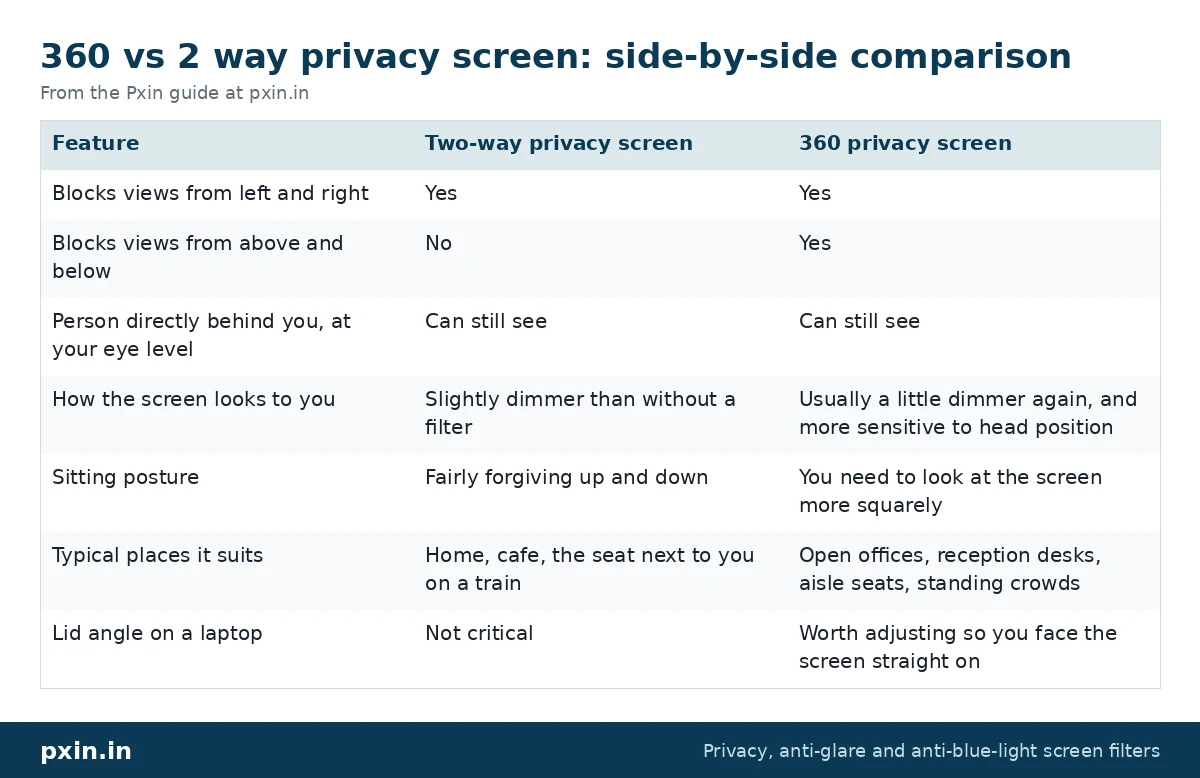
The row that surprises most people is the third one. Neither type hides your screen from someone sitting directly behind you at the same height, because that person is looking through the same "window" as you.
When a two-way filter is enough
A two-way filter is usually the practical choice if:
- You mostly work at home, in a cafe or in a library with people seated beside you.
- You sit with your back to a wall or partition at the office.
- You want the brightest picture you can get from a privacy filter.
- You often lean back or change posture and do not want the screen to dim when you do.
For many people, this covers almost every day of the week. If you are still deciding between privacy and glare control, our post on privacy screen vs anti-glare screen guard explains which problem each one solves.
When a 360 privacy screen makes more sense
Think about a 360 filter if:
- People often stand behind or beside your chair, as in open-plan offices, team pods or reception areas.
- Your desk faces a walkway, so people pass by at standing height and glance down.
- You work in aisle seats on flights or trains, where people walking past look down at your lap.
- You handle salary sheets, customer records or client files where a casual glance from above is a real concern.
In these places the threat comes from above as much as from the side, and a two-way filter leaves that angle open.
The trade-offs of a 360 filter
Here is the honest part. Because a 360 filter controls light in two directions, it asks a little more of you.
Brightness. Any privacy filter makes your screen look dimmer, because light at an angle is being blocked. A 360 filter blocks more of it, so most people raise screen brightness a notch or two. Our post on whether a privacy screen reduces brightness covers what to expect and how to adjust.
Posture. With a 360 filter the vertical viewing range is narrower too. If you slouch low or tilt the lid too far back, the top or bottom of the screen can look darker to you as well. The fix is simple: tilt the laptop lid so the screen faces your eyes squarely.
Rotating devices. On 2-in-1 laptops that you turn upright, a two-way filter's blocked directions turn with the screen. A 360 filter keeps blocking on all four sides whichever way you hold it, which is one reason people with convertible laptops consider it.
None of these are deal-breakers, but they are worth knowing before you choose.
What about touch laptops?
Both types can work on touchscreens when the filter is made from a touch-compatible film and applied flat. We make 360 options for touch laptops as well. Check that the product you choose says touch-compatible, and that it matches your screen size and aspect ratio. Our laptop privacy screens hub lists the regular, touch, magnetic and 360 ranges in one place.
A note on iPads and tablets
Our tablet and iPad privacy guards use two-way privacy (blocks left and right views). When you rotate a tablet from its wide position to upright, the blocked directions rotate with it, so keep that in mind if you mostly read in one orientation.
How to decide in one minute
Ask yourself one question: where do people usually stand or sit when they could see your screen?
- Beside you, at the same height: two-way.
- Behind you, above you or walking past: 360.
- Both, and you handle sensitive data daily: 360, with brightness raised slightly.
Then measure your screen correctly, matching the visible display area and aspect ratio, so the filter covers the whole panel.
Watch: 360° Laptop Privacy Screen Installation | People Can't See What You're Doing | Anti-Glare | pxin.in
https://www.youtube.com/watch?v=6jX3oC-UQEw
Developer: paste this YouTube link on its own line in WordPress so it shows as an embedded video.
Frequently asked questions
Is a 360 privacy screen better than a 2-way privacy screen?
Neither is better in every case. A 360 filter covers more angles, while a two-way filter keeps the picture a little brighter and is more forgiving of posture. Choose based on where onlookers usually are.
Can someone behind me see my screen with a 360 privacy filter?
Yes, if they are directly behind you at roughly your eye level. Privacy filters only block angled views, so a person looking straight over your shoulder sees what you see. Positioning your seat or desk still matters.
Does a 360 privacy screen make the display darker than a 2-way?
It usually feels a little darker, because it blocks light in more directions. Most people simply raise brightness slightly and sit facing the screen squarely.
Is a 4-way privacy screen the same as a 360 privacy screen?
Yes. Both names describe a filter that darkens the screen from the left, right, top and bottom. Two-way filters only cover left and right.
Do 360 privacy screens work on touchscreen laptops?
They can, provided the film is made for touchscreens and sits flat on the glass. Check the product listing for touch support and the exact size before you order.
Find the right filter
If people mostly sit beside you, start with our two-way laptop privacy screen guard range. If you work in open offices, aisle seats or near walkways, look through the 360 category linked above, and match the size and aspect ratio to your screen before you choose.