16:9 vs 16:10 Privacy Screens: Which One Fits Your Laptop?
Last updated: October 2026
Quick answer: A 16:9 screen is wider and shorter, while a 16:10 screen of the same diagonal is a little narrower and noticeably taller, so a 16:9 vs 16:10 privacy screen is not interchangeable. On a 14 inch laptop, the 16:10 screen is about 8 mm narrower and 14 mm taller than the 16:9 one. Check your native resolution (1920 x 1080 means 16:9, 1920 x 1200 or 2560 x 1600 means 16:10) and buy the filter made for that shape.
Customers often ask us why a 14 inch filter does not cover the top of their 14 inch screen. The reason is almost always aspect ratio. Laptop makers moved many models from 16:9 to 16:10 over the last few years, but the screen size on the box still only gives the diagonal. Here is what changes and how to pick correctly.
What is the difference between 16:9 and 16:10?
Aspect ratio is simply the width of the screen compared with its height.
- 16:9 means 16 units wide for every 9 units tall. It is the same shape as most TVs and online video, and it was the standard for budget and mid-range Windows laptops for a long time.
- 16:10 means 16 units wide for every 10 units tall. It is a slightly squarer shape that gives you more vertical space for documents, spreadsheets and web pages. Many newer business laptops, thin and light models and all recent MacBooks use a 16:10 style screen.
Because the diagonal is the same, you might expect the screens to be nearly identical. They are not. Stretching the height means the width has to shrink to keep the same corner to corner measurement.
Why aspect ratio matters for a privacy filter
A privacy filter is a thin film with micro-louvers inside, tiny vertical slats that let light pass straight ahead and block it at steep side angles. It is cut to the active area of the screen, which is the part that lights up.
If you put a 16:9 filter on a 16:10 screen of the same diagonal, the filter is too short. A strip of the screen stays uncovered, usually at the top or bottom, and anyone beside you can read that strip normally. It also tends to stick out a few millimetres past the sides.
If you put a 16:10 filter on a 16:9 screen, it is too tall. It can press on the bezel or the hinge, and on mounts that rely on tabs or slide-in hasps, it may not sit flat.
Either way, the privacy effect is uneven and the filter can shift every time you open the lid.
16:9 vs 16:10 size chart for laptop privacy screens
Here are the calculated active area sizes for popular laptop screen sizes. Widths and heights are rounded to the nearest millimetre.
| Screen size | 16:9 width x height (mm) | 16:10 width x height (mm) | Difference |
|---|---|---|---|
| 13.3 inch | 294 x 166 | 286 x 179 | 16:10 is 8 mm narrower, 13 mm taller |
| 14 inch | 310 x 174 | 302 x 188 | 16:10 is 8 mm narrower, 14 mm taller |
| 15.6 inch | 345 x 194 | 336 x 210 | 16:10 is 9 mm narrower, 16 mm taller |
| 16 inch | 354 x 199 | 345 x 215 | 16:10 is 9 mm narrower, 16 mm taller |
| 17.3 inch | 383 x 215 | 373 x 233 | 16:10 is 10 mm narrower, 18 mm taller |
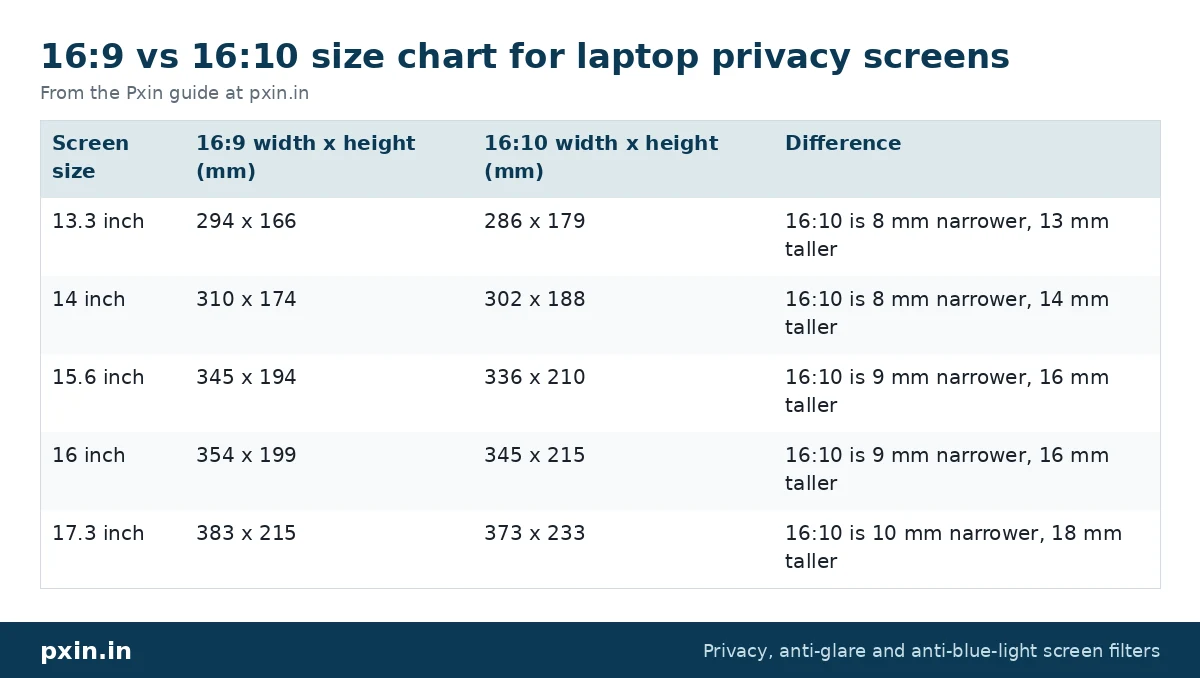
A gap of 14 to 18 mm in height is more than enough to leave a readable strip of screen. That is why we list 16:9 and 16:10 filters as separate products, even in the same inch size.
How to check if your laptop is 16:9 or 16:10
There are three quick ways, and using two of them together removes any doubt.
1. Check the native resolution. On Windows, open Settings, then System, then Display, and look at "Display resolution". The one marked "Recommended" is the native one.
- 1366 x 768, 1920 x 1080, 2560 x 1440, 3840 x 2160: 16:9
- 1920 x 1200, 2560 x 1600, 2880 x 1800, 3840 x 2400: 16:10
2. Measure the screen. Measure the lit area's width and height in millimetres and divide the width by the height. About 1.78 is 16:9. About 1.6 is 16:10. Our step by step guide on how to measure your laptop screen for a privacy filter shows where to place the tape.
3. Look up the model. The model number is on the sticker underneath the laptop. Search it on the maker's website and check the display specification. It usually states the resolution, and sometimes the ratio directly.
If you use a MacBook, the shape varies slightly by model and newer ones have a camera notch, so it is safer to find the exact model first. Our guide on which MacBook model you have explains how.
Which laptops usually have 16:10 screens?
We will not list specific models here, because makers sell the same series with different panels in different years and regions. As a general pattern:
- Many newer premium and business laptops in the 13 to 16 inch range use 16:10.
- Many budget and gaming laptops, especially at 15.6 inch, still use 16:9.
- Some 2-in-1 and tablet style laptops use 3:2, which is squarer than both.
So the pattern is a hint, not an answer. The resolution check takes thirty seconds and is the reliable way.
Picking the right filter once you know your ratio
Once you know the size and the shape, match both. For example:
- A 13.3 inch 16:10 laptop needs a 13.3 inch 16:10 privacy screen filter, not the 16:9 version.
- A 14 inch 16:9 laptop matches our 14 inch 16:9 privacy screen, while a 14 inch 16:10 laptop needs the 14 inch 16:10 privacy screen filter.
- A 16 inch laptop is very often 16:10, so check the 16 inch 16:10 privacy screen filter first, then confirm with your resolution.
Also check the mounting style (adhesive tabs, slide-in hasps or magnetic strips) and whether your laptop has a touchscreen, since touch laptops need a touch-compatible film.
One honest limitation: even a perfectly sized filter makes the screen a little dimmer from the front, and the person directly behind you can still see it. The filter darkens side views beyond roughly 30 degrees each side, which covers the people next to you on a train or in an open office, but not someone standing right behind your chair.
Frequently asked questions
Can I use a 16:9 privacy screen on a 16:10 laptop?
It will not fit well. On the same diagonal, the 16:9 filter is shorter than a 16:10 screen, so a strip of the display stays uncovered and readable from the side. Choose the filter made for your exact ratio.
Is 14 inch 16:10 the same size as 14 inch 16:9?
No. Both measure 14 inches diagonally, but the 16:10 screen is about 302 x 188 mm and the 16:9 screen is about 310 x 174 mm. The 16:10 one is narrower and taller.
How do I know my laptop aspect ratio?
Look at the recommended display resolution in Settings, then System, then Display on Windows. 1920 x 1080 is 16:9 and 1920 x 1200 or 2560 x 1600 is 16:10. You can also divide the measured width by the height.
Is 1920 x 1200 16:9 or 16:10?
1920 x 1200 is 16:10. Divide 1920 by 1200 and you get 1.6, which is the 16:10 shape. 1920 x 1080 gives about 1.78, which is 16:9.
What if my laptop is 3:2?
A 3:2 screen is squarer than both 16:9 and 16:10, so neither filter fits it properly. Measure the active area and contact us with the width, height and model so we can tell you what fits.
Find the right filter
When you know your diagonal and your ratio, browse our laptop privacy screen guard range, where 16:9 and 16:10 sizes are listed separately. Match the size, the shape and the mounting style, and the filter will sit flat and cover the whole screen.