Privacy Screens for Touch Laptops: Do They Still Work With Touch?
Last updated: October 2026
Quick answer: Yes, a touch laptop privacy screen keeps touch working as long as it is a touch-compatible film that sits flat against the glass. Regular hanging or slide-in privacy filters leave a small air gap, and touchscreens usually stop responding through that gap. Expect touch to feel slightly different, a little more drag and a dimmer screen, but taps, scrolling and pinch gestures still work.
Customers with touchscreen laptops and 2-in-1s often ask us the same thing before ordering: "Will I lose touch?" It is a fair worry, because the wrong filter really can make a touchscreen feel dead. Here is how it works and what to choose.
Why a regular privacy filter can stop touch from working
Most laptop touchscreens are capacitive. They sense the tiny electrical change your finger makes when it comes close to the glass. That works through a thin layer that touches the screen, but it struggles across an air gap or a thick, loose sheet.
A standard privacy filter, also called a privacy screen, is usually held in place with slide-in hasps or adhesive tabs on the bezel. It sits just in front of the display, not on it. On a non-touch laptop that is perfect, because the filter can come off easily. On a touchscreen, the gap between filter and glass means your finger is too far from the sensor, so taps are missed or land in the wrong place.
What makes a touch laptop privacy screen different
A touch-compatible privacy screen is designed to lie flat in full contact with the display. With no air gap, your finger stays close enough to the glass for the touch sensor to read it.
The privacy part works the same way as any filter. Inside the film are micro-louvers, which are tiny vertical slats like a very fine window blind. Straight ahead, light passes through and you see the screen clearly. From the side, the slats block the light, and the screen looks dark beyond roughly 30 degrees.
Our touch laptop privacy screen range is made this way, in sizes from 11.6 to 17.3 inch. Because the film is fitted directly on the screen, installation is closer to applying a screen guard than hanging a filter. Our touch privacy screen installation guide walks through it step by step, and our post on how to install a laptop privacy filter covers the general preparation that applies to every type.
Does a privacy screen work on a 2-in-1 laptop in tablet mode?
Yes, with one detail to understand. Standard privacy film blocks views from the left and right when the screen is in its normal wide position. If you rotate a 2-in-1 into portrait mode, the louvers rotate with it, so the film then blocks views from above and below instead of from the sides. People next to you may be able to see the screen in that position.
If you often use your 2-in-1 upright, as a tablet or in tent mode, consider a 360 privacy screen. These block viewing from all four sides, so the screen stays private whichever way you hold it. See the 15.6 inch touch laptop 360 privacy screen as an example, and read our comparison of 360 vs 2-way privacy screens to decide which suits you.
Touch laptop privacy screen sizes: a quick chart
Touch filters must match the visible screen closely, because they sit on the glass rather than over the bezel. Measure the picture area diagonally, without the border, and check your aspect ratio in Windows under Settings, System, Display. A resolution of 1920 x 1080 means 16:9; 1920 x 1200 or 2880 x 1800 means 16:10.
| Laptop size | Aspect ratio | Picture width | Picture height | Common examples |
|---|---|---|---|---|
| 13.3 inch | 16:9 | 294 mm | 166 mm | Compact 2-in-1s |
| 14 inch | 16:9 | 310 mm | 174 mm | Older business convertibles |
| 14 inch | 16:10 | 302 mm | 188 mm | Many 2024 to 2026 models |
| 15.6 inch | 16:9 | 345 mm | 194 mm | Mainstream touch laptops |
| 16 inch | 16:10 | 345 mm | 215 mm | Newer large 2-in-1s |
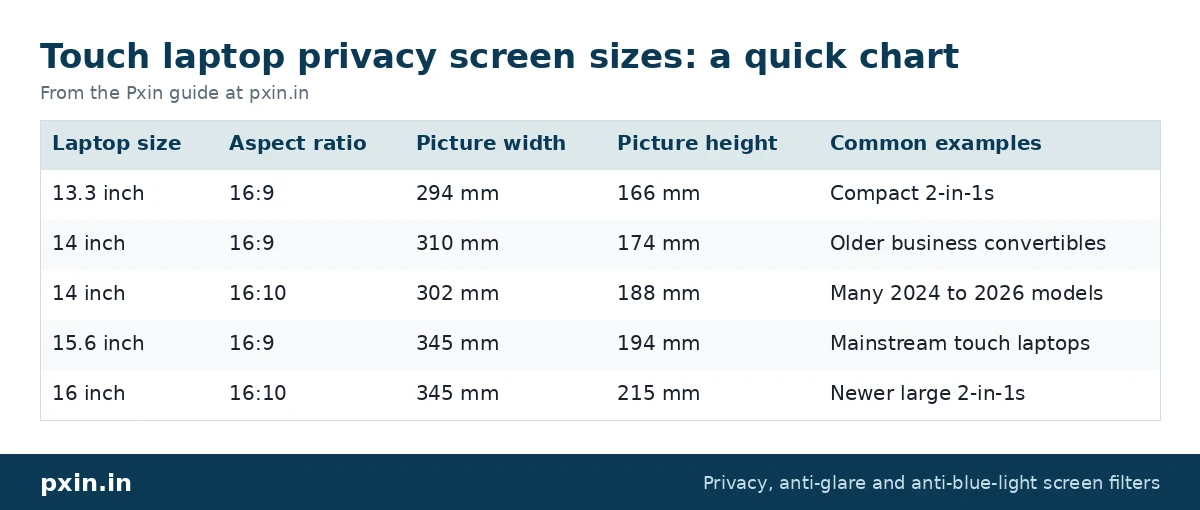
We calculated these widths and heights from the diagonal and aspect ratio, so your laptop should be within a few millimetres. For the two most common sizes, see the 14 inch 16:9 touch privacy screen and the 15.6 inch 16:9 touch privacy screen.
Does a stylus work through a privacy screen?
Most active pens that work on your laptop's bare glass also work through a thin, flat film, because they use the same touch sensor. What changes is the feel. The matte surface of most privacy films adds a little friction, which some people like for handwriting and others find slower for quick sketches.
If you rely on fine pen work, test the pen across the whole screen after fitting, especially near the edges. Windows also has a "Calibrate the screen for pen or touch input" option in Control Panel on touch devices, which can help if taps feel slightly off after a new film is applied.
The honest trade-offs with touch privacy screens
A touch-compatible filter solves the touch problem, but it is still a privacy filter, with the same limits:
- The screen looks dimmer. The louvers block some light from the front too, so you will probably raise brightness a little, which uses slightly more battery.
- Touch feels different. The film has more grip than glass, and fast swipes can feel a little slower at first.
- It is not designed for daily removal. A flat-fitted film stays on. If you want to take privacy off and on several times a day, a touchscreen is not the right place for a hanging filter, so think about whether you need privacy all the time.
- Someone directly behind you can still see. Privacy film only darkens side views.
Watch: India's #1 Touch Laptop Privacy Screen | Installation Procedure | Pxin.in
https://www.youtube.com/watch?v=Al3F-9a7azs
Developer: paste this YouTube link on its own line in WordPress so it shows as an embedded video.
Frequently asked questions
Can I use a normal privacy filter on a touchscreen laptop?
You can fit one, but touch will usually stop working properly while it is on, because of the air gap between the filter and the glass. If you use touch regularly, choose a touch-compatible privacy screen.
Will a privacy screen make my touchscreen less responsive?
A touch-compatible film that lies flat should keep taps, scrolling and gestures working normally. It adds a little surface friction, so swipes can feel slightly different at first.
Does a touch privacy screen work in tablet mode?
It works for touch in every position. For privacy, a standard film blocks side views only in the normal wide position, so if you often use portrait mode, a 360 privacy screen is the better fit.
How do I remove bubbles from a touch privacy screen?
Small bubbles near the edge can usually be pushed out with a soft card wrapped in a microfibre cloth. Large bubbles mean dust is trapped underneath, so lift that corner carefully, clean the spot and lay the film down again.
Is a touch privacy screen also anti-glare?
Most privacy films have a matte surface, so they also cut reflections from windows and lights. That matte finish is part of why the screen looks slightly softer than bare glass.
Find the right filter
Check your laptop's size and aspect ratio, decide whether you need 2-way or 360 privacy, and then choose a film made for touch. You can see every size in our touch laptop privacy screen category.