How to Measure Your Laptop Screen for a Privacy Filter
Last updated: October 2026
Quick answer: To measure your laptop screen for a privacy filter, measure the lit display area only (not the plastic bezel) from corner to corner, then measure its width and height and divide each by 2.54 to get inches. Check your aspect ratio (16:9, 16:10 or another shape) in your display settings, because two screens with the same diagonal can be very different shapes. Match both the diagonal and the width and height to the filter you choose.
Customers often ask us why a "15.6 inch" filter did not fit their "15.6 inch" laptop. Almost every time, the diagonal was right but the shape was wrong, or the measurement included the bezel. This guide walks you through the method we use ourselves when helping someone find the right size.
What does "active area" mean on a laptop screen?
The active area is the part of the screen that actually lights up and shows pixels. It does not include the black or silver border (the bezel) around it, and it does not include the webcam strip at the top.
A privacy filter is a thin sheet with tiny vertical blinds inside it, called micro-louvers. These louvers let light travel straight towards you and block it at steep side angles, so people beside you see a dark screen. For the effect to be even, the filter has to cover the whole active area. If it is too small, a strip of normal screen shows at the edge. If it is too large, it can sit on the bezel unevenly or get in the way of the hinge.
That is why a laptop's advertised size, which is always the diagonal of the active area, is only the starting point.
How to measure your laptop screen in 4 steps
You need a soft measuring tape or a ruler with centimetre marks. A cloth tape is gentler on the screen than a metal one.
- Turn the screen on and open a white page. A bright, plain page makes the edges of the active area easy to see. Without it, the line between the dark bezel and a dark screen is hard to spot.
- Measure the diagonal. Go from the top left corner of the lit area to the bottom right corner. Do not press the tape onto the panel. Write the number down in centimetres, then divide by 2.54 to get inches.
- Measure the width and height. Measure the lit area side to side, then top to bottom. These two numbers matter more than the diagonal when you compare filter sizes.
- Check the aspect ratio. Divide the width by the height. A result close to 1.78 means 16:9. Close to 1.6 means 16:10. Close to 1.5 means 3:2, and close to 1.33 means 4:3.
If your diagonal comes out at something like 15.4 or 15.7 inches, you are almost certainly looking at a 15.6 inch screen. Small differences of a few millimetres come from where you placed the tape, and that is normal.
How to find your laptop's aspect ratio without a tape
You can also confirm the shape from your laptop's settings, which is a good double check.
- Windows: open Settings, go to System, then Display, and look at "Display resolution". 1920 x 1080, 2560 x 1440 and 3840 x 2160 are 16:9. 1920 x 1200, 2560 x 1600 and 2880 x 1800 are 16:10.
- Model number: the sticker under the laptop, or the box, gives the exact model. Searching the model on the maker's website shows the screen size and resolution.
- MacBook: MacBooks need model-specific filters because of their thin lids and, on newer models, the camera notch. Our guide on which MacBook model you have shows how to find the exact model first.
Keep the recommended (native) resolution in mind, not a scaled one you may have picked to make text larger. Windows marks the native option as "Recommended".
Laptop privacy filter size chart (active area)
The numbers below are calculated from the diagonal and the aspect ratio, rounded to the nearest millimetre. Use them to sanity check your own measurement.
| Screen size | Aspect ratio | Width (mm) | Height (mm) |
|---|---|---|---|
| 13.3 inch | 16:9 | 294 | 166 |
| 13.3 inch | 16:10 | 286 | 179 |
| 14 inch | 16:9 | 310 | 174 |
| 14 inch | 16:10 | 302 | 188 |
| 14 inch | 4:3 | 284 | 213 |
| 15.6 inch | 16:9 | 345 | 194 |
| 15.6 inch | 16:10 | 336 | 210 |
| 16 inch | 16:9 | 354 | 199 |
| 16 inch | 16:10 | 345 | 215 |
| 17.3 inch | 16:9 | 383 | 215 |
| 17.3 inch | 16:10 | 373 | 233 |
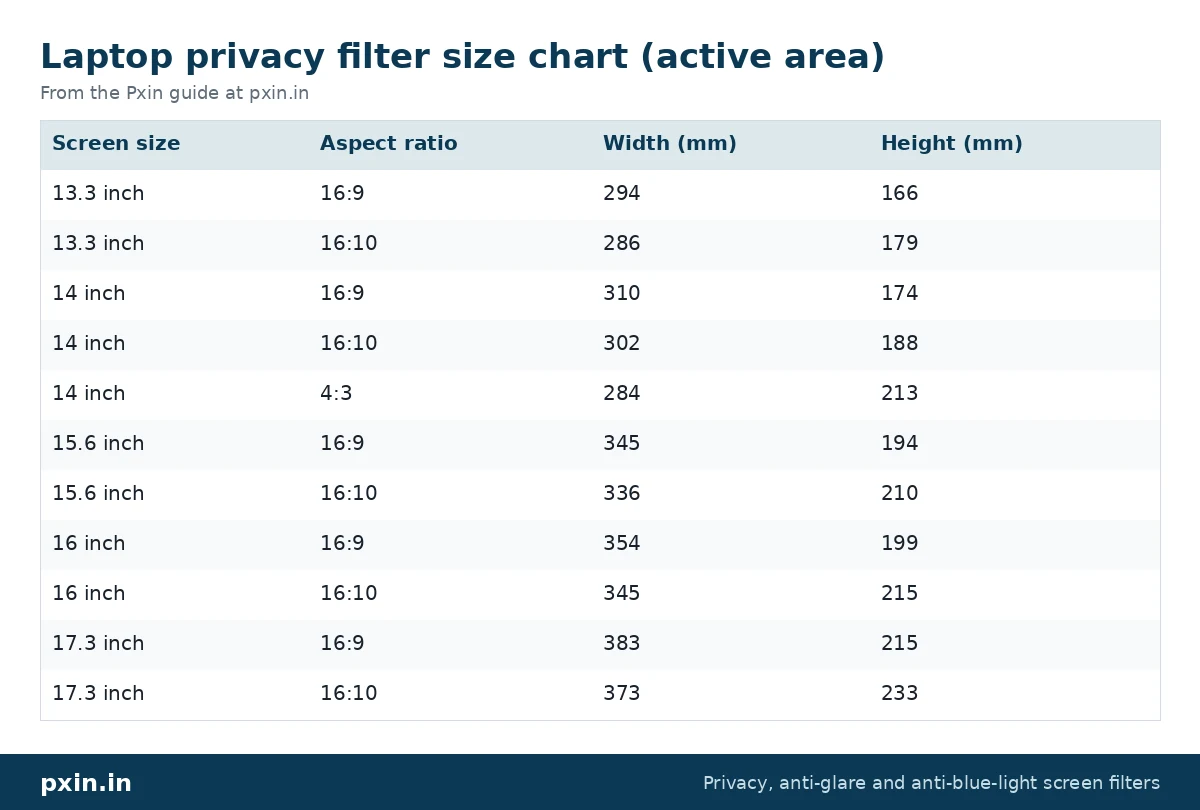
Look at the 15.6 inch rows. The 16:10 screen is 9 mm narrower and 16 mm taller than the 16:9 one, even though both are sold as 15.6 inch. A filter made for one will not sit properly on the other. We explain this in more detail in 16:9 vs 16:10 privacy screens.
Once you know your size, compare your width and height with the dimensions listed on the product page. For the most common size, see our 15.6 inch laptop privacy screen filter. For a slimmer 14 inch machine with a taller screen, the 14 inch 16:10 privacy screen filter is the one to check.
Common measuring mistakes
These are the mix ups we see most often:
- Measuring the bezel. This adds a centimetre or more and pushes you to the next size up. Always measure only the lit area.
- Trusting the diagonal alone. Two 14 inch laptops can need different filters. Width and height settle it.
- Rounding too early. Write the centimetres first, then convert. Rounding 34.5 cm to 35 cm before converting can move you towards the wrong size.
- Ignoring touchscreens. A touch laptop needs a touch-compatible film so taps still register. Check that before you choose.
- Forgetting the mounting style. Adhesive tabs, slide-in hasps and magnetic strips all sit slightly differently near the edges. Read the fitting method for the product you pick.
How should a privacy filter sit once it is on?
A well matched filter covers the full lit area with an even margin and does not press on the hinge when you tilt the lid. With tabs or hasps, the filter rests just inside the bezel. Our laptop privacy screen installation guide shows the slide-in and adhesive methods step by step, with photos.
One honest limitation to expect: any privacy filter makes the screen look somewhat dimmer from the front, because the louvers block part of the light. Most people simply raise the brightness a little. The person sitting directly behind you can also still see the screen, because the filter only darkens side angles of roughly 30 degrees and beyond on each side.
Frequently asked questions
How do I measure my laptop screen size in inches?
Measure the lit display area diagonally from one corner to the opposite corner in centimetres, then divide by 2.54. Do not include the bezel. The result should be close to a standard size such as 13.3, 14, 15.6 or 16 inches.
Do I measure the screen with or without the bezel for a privacy filter?
Without the bezel. A privacy filter is sized to the active area, which is the part that lights up. Including the border makes your measurement too large.
Will a 15.6 inch privacy screen fit a 16 inch laptop?
Usually not well. A 16 inch 16:10 screen is about 345 x 215 mm, while a 15.6 inch 16:9 filter is sized for about 345 x 194 mm, so a strip of screen would stay uncovered at the top or bottom. Measure width and height and pick the filter that matches both.
How do I know if my laptop is 16:9 or 16:10?
Check the native resolution in your display settings. 1920 x 1080 is 16:9 and 1920 x 1200 or 2560 x 1600 is 16:10. You can also divide your measured width by height: about 1.78 is 16:9 and about 1.6 is 16:10.
What if my laptop size is not in the chart?
Some laptops use 3:2 or other shapes. Measure the width and height of the lit area and contact us with those numbers and your model, and we will tell you honestly whether a standard size fits.
Find the right filter
When you have your width, height and aspect ratio written down, browse our laptop privacy screen guard range and pick the size that matches all three. If you use a MacBook, start with the model check first, since Apple screens need their own fit.