Which MacBook Model Do I Have? Find It Before You Buy a Screen Guard
Last updated: October 2026
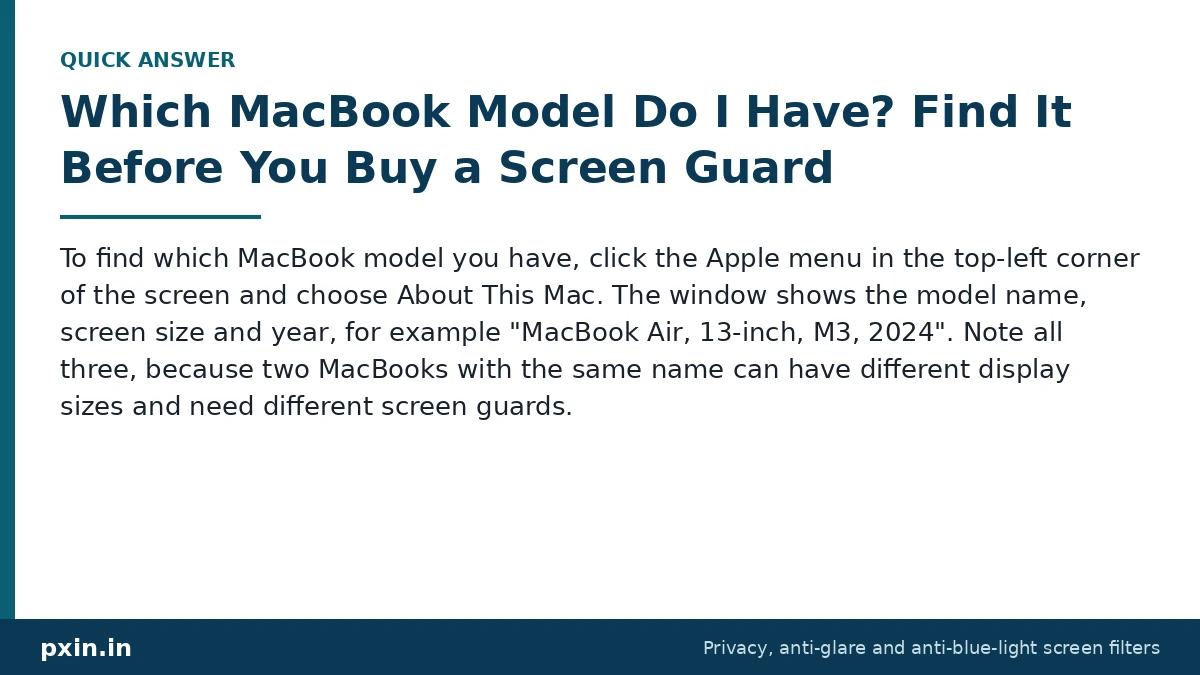
Quick answer: To find which MacBook model you have, click the Apple menu in the top-left corner of the screen and choose About This Mac. The window shows the model name, screen size and year, for example "MacBook Air, 13-inch, M3, 2024". Note all three, because two MacBooks with the same name can have different display sizes and need different screen guards.
Customers often ask us why a MacBook screen guard looks a few millimetres off. Often the filter is fine and the model was mixed up, for example a 13.3 inch MacBook Air ordered as a 13.6 inch, or the other way round. Two minutes of checking saves that hassle.
How to check your MacBook model with About This Mac
This works on every MacBook that turns on:
- Click the Apple logo in the top-left corner of the screen.
- Choose About This Mac.
- Read the model name in the window, such as "MacBook Pro, 14-inch, 2023".
- On newer versions of macOS, click More Info to open System Settings and see the same details along with the serial number.
Apple's own page to identify your MacBook Air model lists every MacBook Air by year with its model identifier, which is handy if you want to double-check. Write down the name exactly as shown, including the year and chip.
What if your MacBook will not start?
If the Mac does not turn on, you still have three ways to find the model:
- The underside of the case. The serial number is printed in small text on the bottom of the MacBook. You can use it with Apple's support tools to look up the exact model.
- The original box. The label on the box lists the model name, year and serial number.
- Your invoice. The purchase invoice or order email usually names the model and year.
You may also see a "Model A" number on the bottom case. That is a regulatory number. It is useful, but the model name from About This Mac or the serial number is easier to match against a screen size.
Why the year matters as much as the name
Apple reuses names. "MacBook Air 13-inch" covers two different screen sizes, and "MacBook Pro 16-inch" covers two as well. Screen guards are cut to the exact display, so a filter for one will not fit the other properly.
Here is how common MacBook names map to their display size:
| Model name in About This Mac | Years | Display size | Notch at top |
|---|---|---|---|
| MacBook Air (Retina, 13-inch) and MacBook Air (M1) | 2018 to 2020 | 13.3 inch | No |
| MacBook Air 13-inch (M2, M3, M4, M5) | 2022 onwards | 13.6 inch | Yes |
| MacBook Air 15-inch (M2, M3, M4, M5) | 2023 onwards | 15.3 inch | Yes |
| MacBook Pro 13-inch (Intel, M1, M2) | 2016 to 2022 | 13.3 inch | No |
| MacBook Pro 14-inch | 2021 onwards | 14.2 inch | Yes |
| MacBook Pro 16-inch (Intel) | 2019 | 16.0 inch | No |
| MacBook Pro 16-inch (Apple silicon) | 2021 onwards | 16.2 inch | Yes |
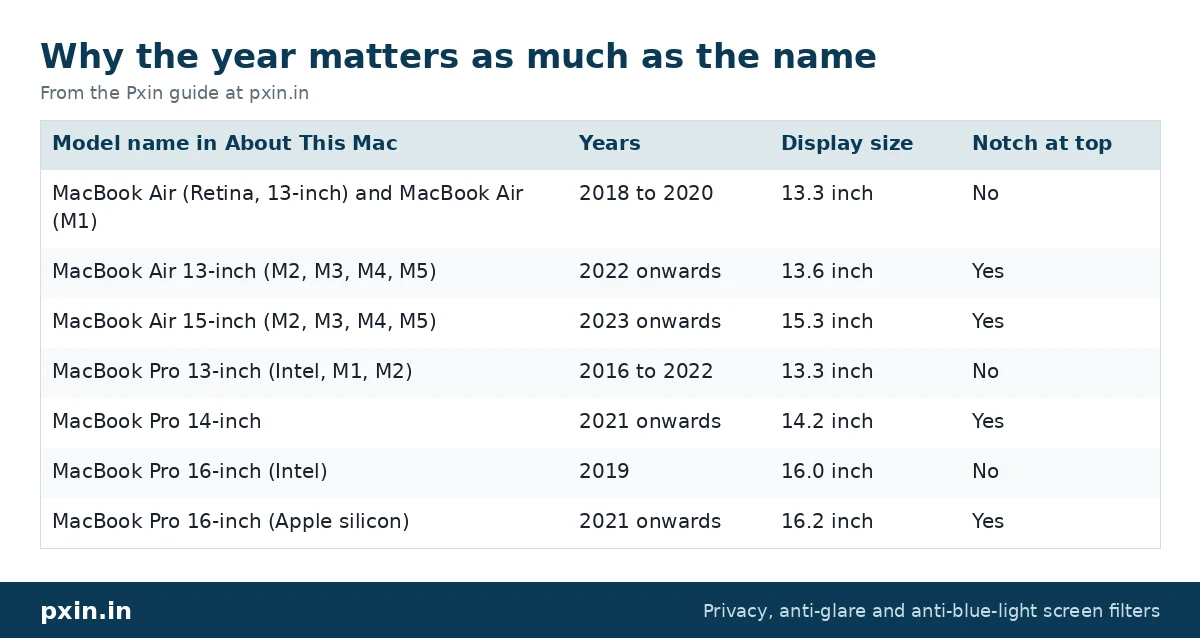
Notice how a MacBook Air M1 and a MacBook Air M2 are both sold as 13 inch, yet one has a 13.3 inch display and the other has a 13.6 inch display with a notch. The same applies to the 16 inch MacBook Pro before and after 2021. If you are ever unsure, measure the visible screen diagonally, without the black border. Our guide on how to measure a laptop screen for a privacy filter explains the method.
Which MacBook model do I have for a screen guard: what to note down
Before you order a privacy or anti-glare screen guard, note these four things:
- Family: MacBook Air or MacBook Pro.
- Size: the inch figure in the name.
- Year and chip: for example 2024, M3.
- Notch: yes for most models from 2021 onwards.
With those, you can pick the right product. For the current models, these are the matching pages:
- MacBook Air 13.6 inch privacy screen for the 13-inch Air from M2 onwards
- MacBook Air 15 inch privacy screen for the 15-inch Air
- MacBook Pro 14 inch privacy screen for the 14-inch Pro
- MacBook Pro 16 inch privacy screen for the 16-inch Pro
Does the model matter for anti-glare screen guards too?
Yes. An anti-glare screen guard is a matte film that spreads out reflections from windows and lights, and it is cut to the same display outline as a privacy filter. The same rules apply: match the family, size and year, and check how the guard treats the notch area. If your main problem is glare from a window rather than people looking at your screen, a matte guard may be all you need, and it keeps the screen brighter than a privacy filter does.
Things to know about MacBook screens before you add a guard
MacBooks have a very small gap between the display and the keyboard when the lid is closed. Apple's article on closing a MacBook with a cover on the display advises against covers thicker than 0.1 mm on the camera area and warns that items left on the display can damage it when the lid closes. That is why the right size matters so much: a filter that overlaps the edge or bunches near the camera is a risk.
This is also where the type of mount comes in. A magnetic filter can come off before you close the lid, while a fixed filter stays on all the time. We compare both in our post on magnetic vs adhesive MacBook privacy screens.
One honest point: even a perfectly fitted privacy screen makes the display look a little dimmer, because it blocks some light to hide the screen from the sides. Most people raise the brightness slightly and get used to it within a day or two, but if you do colour-critical photo work, plan to remove the filter for that.
Frequently asked questions
How do I know if my MacBook Air is 13.3 or 13.6 inch?
Check About This Mac. If it says MacBook Air (M1, 2020) or older, the display is 13.3 inch. If it says MacBook Air 13-inch with an M2 or later chip, it is 13.6 inch with a notch at the top.
Where is the model number on a MacBook?
The serial number and a "Model A" number are printed on the underside of the case. The simplest way to read the model name is About This Mac in the Apple menu.
Will a 13.3 inch MacBook screen guard fit a 13.6 inch MacBook Air?
No. The 13.6 inch display is a different shape and has a notch, so a 13.3 inch guard will leave gaps or overlap the edges. Always order for your exact model and year.
Is the MacBook Pro 14 inch screen exactly 14 inches?
No, its display measures 14.2 inches diagonally. Screen guards sold for the MacBook Pro 14 inch are made for this size, so order by model name rather than by tape measure alone.
Do I need a different screen guard for an M4 or M5 MacBook?
Not always. Within the same family and size, such as the 13-inch MacBook Air from M2 onwards, the display size stays at 13.6 inch. Check the year range on the product page to be sure.
Find the right filter
Once you know your exact model, size and year, matching a screen guard is simple. Browse every current size in our MacBook privacy screen category and pick the one that matches the name in About This Mac.