MacBook Privacy Screen: Magnetic vs Adhesive
Last updated: October 2026
Quick answer: A magnetic MacBook privacy screen snaps on and comes off in seconds, so it suits people who remove it often, share their screen or close the lid many times a day. An adhesive MacBook privacy screen stays fixed and looks neater, but it stays in the narrow gap between screen and keyboard every time the lid closes, so it suits people who keep the filter on all the time and accept that trade-off.
Both types use the same privacy film. The real question in magnetic vs adhesive MacBook privacy screen choices is how the filter lives with you day to day, and what happens when you shut the lid. Customers often ask us which one to pick, so here is the full answer.
How each type attaches to a MacBook
A privacy screen, also called a privacy filter, is a thin sheet with micro-louvers inside it. These are tiny vertical slats that let light through straight ahead and block it at an angle, so people beside you see a dark screen beyond roughly 30 degrees.
Magnetic privacy screens hold on with magnets. Depending on the design, the filter clings to the frame around the display or to thin magnetic strips that you stick on the bezel once. You can lift it off and put it back as often as you like, and it leaves nothing on the screen itself.
Adhesive privacy screens use small adhesive tabs on the bezel, or a thin adhesive edge, to hold the filter flat. Once fitted, it stays put. You can remove it, but it is designed to live on the Mac, not to come on and off every day.
If you are not sure which MacBook you own, sort that out first, because sizes differ by only a few millimetres between models. Our guide on which MacBook model do I have shows how to check in under a minute.
Can you close a MacBook lid with a privacy screen on?
This is where the two types really differ. Apple's support article on closing a MacBook with a cover on the display explains that the gap between a MacBook display and the keyboard is very tight. Apple advises against camera covers thicker than 0.1 mm and warns that items left on the display can damage it when the lid closes.
What that means in practice:
- Magnetic: the safest habit is to take the filter off before you close the lid, or at least check that it is lying perfectly flat with nothing trapped under it. Because removal takes a second, most people simply get into the habit.
- Adhesive: the filter stays in the lid gap every time you close the Mac. That is why adhesive filters must be very thin and fitted perfectly flat. If you are someone who throws the MacBook into a bag many times a day, think carefully about this.
On models with a notch, such as the MacBook Air from the M2 generation onwards and the 14 and 16 inch MacBook Pro, check that the filter edge clears the camera area. Apple's 0.1 mm guidance on the camera area is the key number to keep in mind.
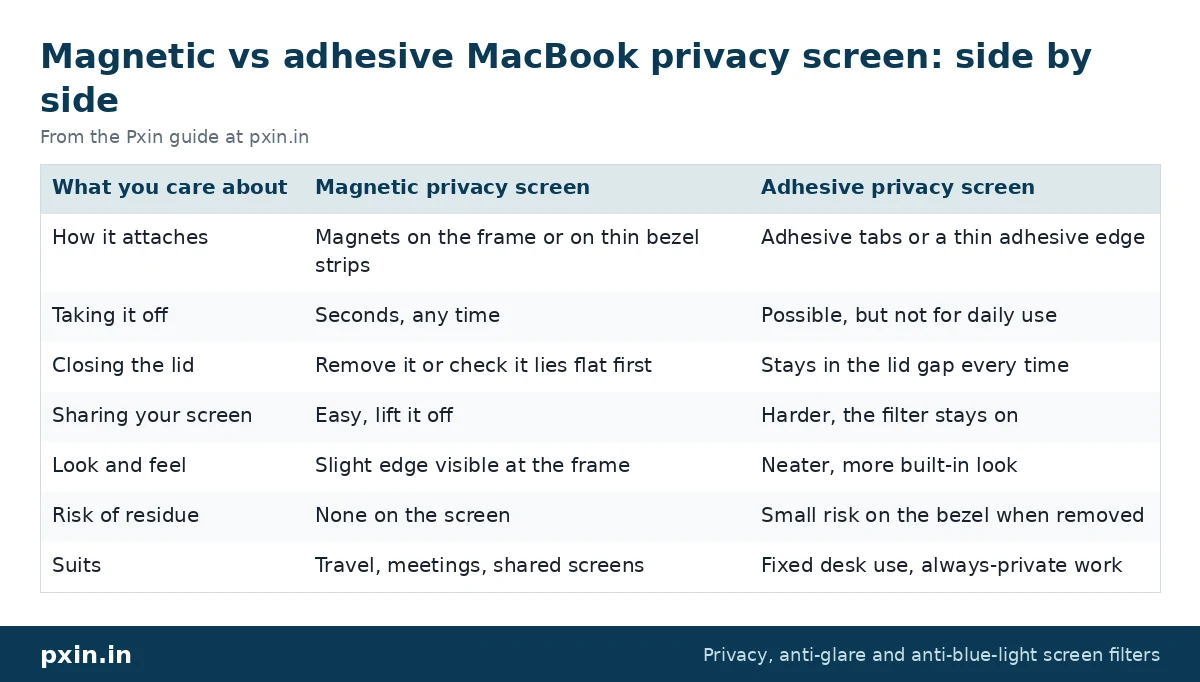
Magnetic vs adhesive MacBook privacy screen: side by side
| What you care about | Magnetic privacy screen | Adhesive privacy screen |
|---|---|---|
| How it attaches | Magnets on the frame or on thin bezel strips | Adhesive tabs or a thin adhesive edge |
| Taking it off | Seconds, any time | Possible, but not for daily use |
| Closing the lid | Remove it or check it lies flat first | Stays in the lid gap every time |
| Sharing your screen | Easy, lift it off | Harder, the filter stays on |
| Look and feel | Slight edge visible at the frame | Neater, more built-in look |
| Risk of residue | None on the screen | Small risk on the bezel when removed |
| Suits | Travel, meetings, shared screens | Fixed desk use, always-private work |
When a magnetic MacBook privacy screen makes more sense
Choose magnetic if any of these sound like you:
- You present your screen in meetings or show work to clients.
- You use your MacBook for photo or video editing and want full brightness and colour without the filter at times.
- You work in trains, flights and cafes and close the lid often.
- You share the Mac with family at home and only need privacy outside.
Our magnetic range covers the current MacBook Air and MacBook Pro sizes. For the most common model, see the MacBook Air 13.6 inch magnetic privacy screen. Fitting steps are in our magnetic privacy screen installation guide, which covers MacBooks as well as Windows laptops.
When an adhesive MacBook privacy screen makes more sense
Choose a fixed filter if:
- The Mac stays on one desk and is rarely closed during the day.
- Your work is always confidential, such as HR, legal or finance, and you never want to forget to put the filter back.
- You dislike any visible edge and want the cleanest look.
- You are likely to misplace a loose filter.
You will find fixed-mount options for MacBook Air and MacBook Pro sizes in our MacBook privacy screen category.
What stays the same with both types
Whichever you pick, the privacy effect is the same, because it comes from the film, not the mount. Side views go dark, and you see the screen normally from the front.
There are also limits that apply to both. A privacy screen blocks some light, so your MacBook looks a little dimmer and you may raise brightness by a step or two, which uses a bit more battery. We explain this in detail in our post on whether a privacy screen reduces brightness. And neither type hides the screen from someone directly behind you, so on a train or in a cafe, where you sit still matters.
Watch: Pxin Magnetic Privacy Screen guard installation | Pxin | India's Best selling Privacy Screen brand
https://www.youtube.com/watch?v=_z8-7e259W0
Developer: paste this YouTube link on its own line in WordPress so it shows as an embedded video.
Watch: MacBook Magnetic Privacy Filter | Anti Glare Screen Guard | MacBook Air Screen Protector | Pxin.in
https://www.youtube.com/watch?v=L4JUmSYET5U
Developer: paste this YouTube link on its own line in WordPress so it shows as an embedded video. Video by KK World.
Frequently asked questions
Is a magnetic privacy screen safe for a MacBook?
A magnetic filter is safe to use when it is fitted correctly and removed or checked before you close the lid. Apple warns that items left on the display can damage it when the lid closes, so the safe habit is to take it off before shutting the Mac.
Will an adhesive privacy screen leave marks on my MacBook?
Adhesive tabs sit on the bezel, not on the display. If you remove them, a little residue can stay on the bezel, and a soft cloth with a screen-safe cleaner usually lifts it. Never use harsh solvents near the display.
Does a magnetic privacy screen fall off in a bag?
You should not carry the MacBook in a bag with a magnetic filter on, because the lid needs to close fully. Take the filter off and store it in its sleeve, which also keeps it free of scratches.
Do MacBook privacy screens work with the notch?
Yes, but check that the filter edge clears the camera area, where Apple advises against anything thicker than 0.1 mm. Make sure you order the filter for your exact model.
Which is better for a MacBook Pro 14 inch?
It depends on how you use it, not on the model. If you close the lid often or present your screen, choose magnetic; if the Mac lives on one desk, a fixed filter works well.
Find the right filter
Pick the mount based on how often you close the lid and share your screen, then choose the exact model size. Browse our MacBook magnetic privacy screen range for removable filters, or see the MacBook Pro 14 inch privacy screen if that is your Mac.