Privacy Screen vs Anti-Glare Screen Guard: Which Do You Need?
Last updated: October 2026
Quick answer: In the privacy screen vs anti glare question, the two solve different problems. A privacy screen darkens the display for anyone looking from the side, so it protects what is on your screen in public places, while an anti-glare screen guard is a matte film that softens reflections from windows and lights so the screen is easier to read. If people around you are the problem, pick privacy; if reflections are the problem, pick anti-glare.
Customers often ask us this, and it is a fair question. Both products are thin films that sit on your screen, both are often called "screen guards", and many privacy filters also have a matte surface. But they are built for different jobs, and picking the wrong one leaves you with the same problem you started with.
What does a privacy screen do?
A privacy screen (also called a privacy filter) contains micro-louvers. These are tiny vertical slats inside the film, a bit like a window blind turned on its side. Light from the screen passes straight through towards you, but at steep side angles the slats block it.
The result: you see the screen normally from the front, while someone sitting beside you sees it turn dark beyond roughly 30 degrees on each side. This is useful on trains and flights, in cafes, in coworking spaces, at reception desks and anywhere people can glance at your work.
The reason this matters is well documented. In a 2015 study by the Ponemon Institute in US offices, 88% of attempts to visually collect sensitive information succeeded, 70% went unnoticed, and 53% of the exposed information came from screens.
What does an anti-glare screen guard do?
An anti-glare screen guard is a matte film. Its surface has a very fine texture that scatters incoming light, so instead of a sharp mirror image of a window or a tube light, you see a soft, spread out haze that is much easier to read through.
It does not block anyone's view of your screen. People beside you can still read it just as before. Its job is comfort and readability, especially on glossy laptop screens and monitors that sit opposite a window or under bright office lighting.
Many anti-glare guards, including ours, also add an anti-blue-light layer. That can make the screen feel warmer, but we prefer to be clear about what the research says on that: a 2023 Cochrane review found blue-light-filtering lenses showed little or no short-term benefit for eye strain. The more dependable comfort gain from a matte guard is fewer reflections.
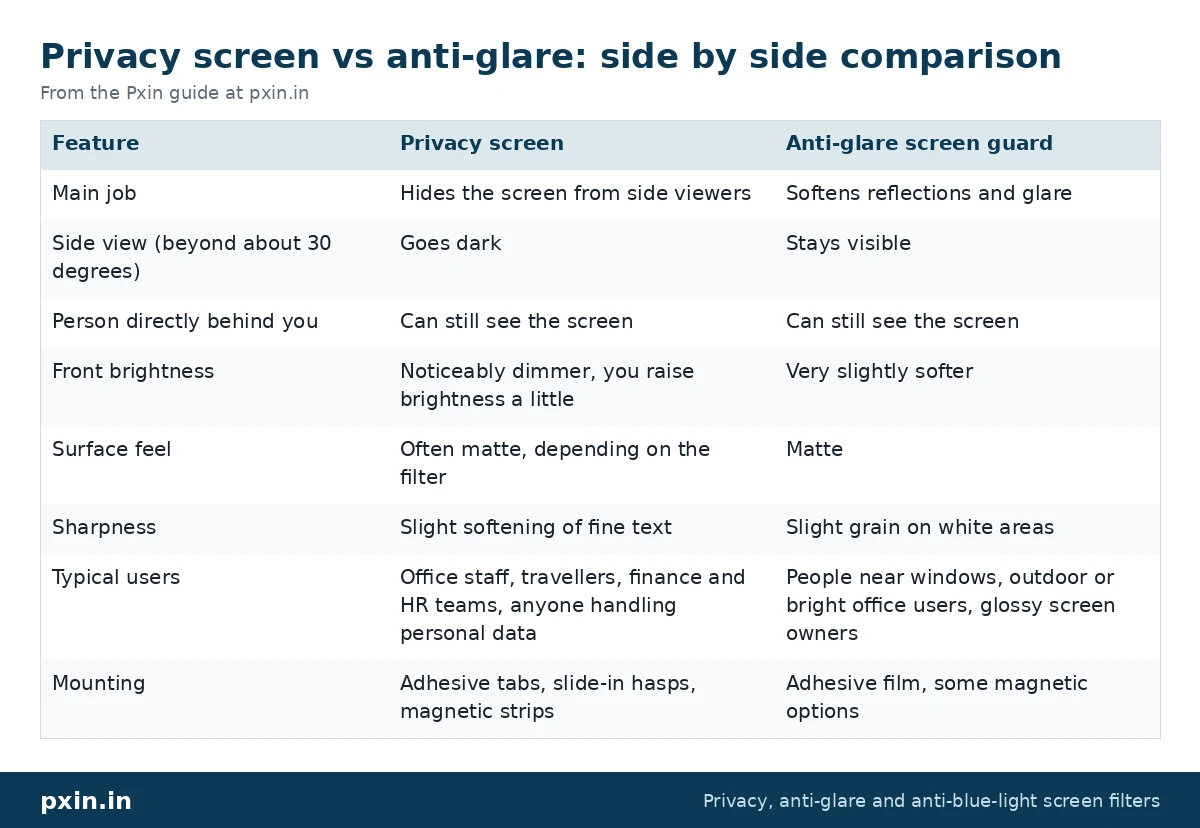
Privacy screen vs anti-glare: side by side comparison
| Feature | Privacy screen | Anti-glare screen guard |
|---|---|---|
| Main job | Hides the screen from side viewers | Softens reflections and glare |
| Side view (beyond about 30 degrees) | Goes dark | Stays visible |
| Person directly behind you | Can still see the screen | Can still see the screen |
| Front brightness | Noticeably dimmer, you raise brightness a little | Very slightly softer |
| Surface feel | Often matte, depending on the filter | Matte |
| Sharpness | Slight softening of fine text | Slight grain on white areas |
| Typical users | Office staff, travellers, finance and HR teams, anyone handling personal data | People near windows, outdoor or bright office users, glossy screen owners |
| Mounting | Adhesive tabs, slide-in hasps, magnetic strips | Adhesive film, some magnetic options |
Which one do you need? A quick checklist
Ask yourself these questions honestly. The answers usually point one way.
You probably need a privacy screen if:
- You open email, bank accounts, client files or company dashboards in public.
- You sit in an open office or shared workspace where people walk behind and beside you.
- You travel often and work on trains, buses or flights.
- Your work involves customer data, salaries, medical or financial records.
You probably need an anti-glare screen guard if:
- You see your own face or the window in your screen.
- You work near a window, on a balcony or under strong overhead lights.
- Your laptop has a glossy screen and you find yourself tilting it to read.
- Privacy is not a concern, for example at home in your own room.
If both lists sound like you, a privacy filter with a matte surface covers both needs reasonably well. Many privacy filters, including several in our laptop privacy screen guard range, have an anti-glare finish as well, so you get fewer reflections plus side-view protection.
Can you use a privacy screen and an anti-glare guard together?
Usually you do not need to. Stacking two films adds thickness, can create bubbles or a hazy double layer, and on a laptop it can stop the lid from closing cleanly. If you need both effects, choose one privacy filter that already has a matte finish.
On MacBooks, take extra care with anything you put on the screen. Apple notes that the gap between the display and keyboard is very tight, so thickness matters. MacBook owners should pick a filter made for their exact model.
What do you give up with each?
Every screen film is a trade-off, and we would rather you know that before you choose.
- Privacy screen: the screen looks dimmer from the front, so most people raise brightness a little. The person sitting directly behind you can still see it. Colours and fine text look a touch softer.
- Anti-glare guard: the matte texture adds a slight grain, which you notice most on large white areas. It does nothing for privacy.
For most office and travel users, these trade-offs are small compared with the benefit. For colour-critical work such as photo grading, either film changes how the screen looks, so you may prefer to remove the filter while editing.
What about monitors and iMacs?
The same logic applies to desktop screens. For a monitor that faces a window, a monitor anti-glare screen guard reduces reflections. For an iMac 24 inch with its glossy glass, an iMac 24 inch anti-glare screen guard is the matching option. If your desk is in a busy area where people pass behind or beside you, a privacy filter is the better choice.
Watch: Best Anti Glare Screen Protector For Laptop | PxIn Privacy Screen Filter
https://www.youtube.com/watch?v=Rw4Jv4M57o4
Developer: paste this YouTube link on its own line in WordPress so it shows as an embedded video. Video by KK World.
Frequently asked questions
Is a privacy screen the same as an anti-glare screen?
No. A privacy screen uses micro-louvers to darken the display for people looking from the side. An anti-glare screen is a matte film that scatters reflections. Some privacy filters also have a matte, anti-glare surface, but a plain anti-glare guard gives no privacy.
Does a privacy screen reduce glare?
Many do, if the surface is matte. The louvers themselves do not stop reflections, so check whether the filter has an anti-glare finish. Our post on whether a privacy screen reduces brightness explains the brightness side of this.
Does anti-glare reduce eye strain?
Anti-glare can make reading more comfortable by cutting reflections, which is one cause of squinting. It is not a medical treatment. Regular breaks, good lighting and a sensible screen distance still matter more.
Which is better for a laptop used in an office?
If colleagues sit close by or you handle personal or client data, a privacy screen is the more useful choice, ideally one with a matte surface. If you sit alone near a bright window, an anti-glare guard is enough.
Do anti-blue-light screen guards work?
They reduce some blue light, but the evidence for eye strain relief is weak. A 2023 Cochrane review found little or no short-term benefit from blue-light-filtering lenses. Our post on whether anti-blue-light helps your eyes covers what it can and cannot do.
Find the right filter
If reflections are your main problem, start with our laptop anti-glare screen guards. If people around you are the concern, the laptop privacy range is the place to look, and many of those filters handle glare too.