iPad Privacy Screen Guard: What to Check Before Buying
Last updated: October 2026
Quick answer: Before you buy an iPad privacy screen guard, confirm your exact iPad model, because sizes, corners and camera positions change between generations. Our iPad guards use two-way privacy (blocks left and right views), so think about which way you usually hold your iPad. Also check that the guard suits Apple Pencil use and Touch ID or Face ID, and expect the screen to look a little dimmer than before.
iPads have become work machines. People answer email, review files, take client notes and join video calls on them, often in cafes, trains and shared offices. That makes privacy a real question. But iPad models look alike, and a guard made for the wrong one will not fit. This checklist covers what to confirm first.
1. Identify your exact iPad model
"iPad Air" or "iPad Pro" is not enough. Each line has had several generations with different screen sizes, corner shapes and camera positions. A guard cut for one may leave gaps or cover the camera on another.
The reliable way is the model number. Go to Settings, then General, then About, and look at Model Name and Model Number. Apple's page to identify your iPad model matches each model number to its name and year. Once you know it, pick the guard listed for that exact model, such as our iPad Air 11 inch M3 privacy screen guard or the iPad 11 inch A16 privacy screen guard.
iPad screen sizes at a glance
Here are approximate visible screen dimensions, worked out from each model's stated diagonal and resolution. Real guards are cut slightly differently to suit rounded corners and the camera, so always choose by model, not by these numbers alone.
| iPad model | Screen diagonal | Resolution | Approx. visible area (W x H) |
|---|---|---|---|
| iPad mini (A17 Pro, 2024) | 8.3 inch | 2266 x 1488 | 176 x 116 mm |
| iPad 10th generation | 10.9 inch | 2360 x 1640 | 227 x 158 mm |
| iPad 11 inch (A16, 2025) | 11 inch | 2360 x 1640 | 229 x 159 mm |
| iPad Air 11 inch (M3, 2025) | 11 inch | 2360 x 1640 | 229 x 159 mm |
| iPad Pro 11 inch (M4, 2024) | 11 inch | 2420 x 1668 | 230 x 159 mm |
| iPad Pro 13 inch (M4, 2024) | 13 inch | 2752 x 2064 | 264 x 198 mm |
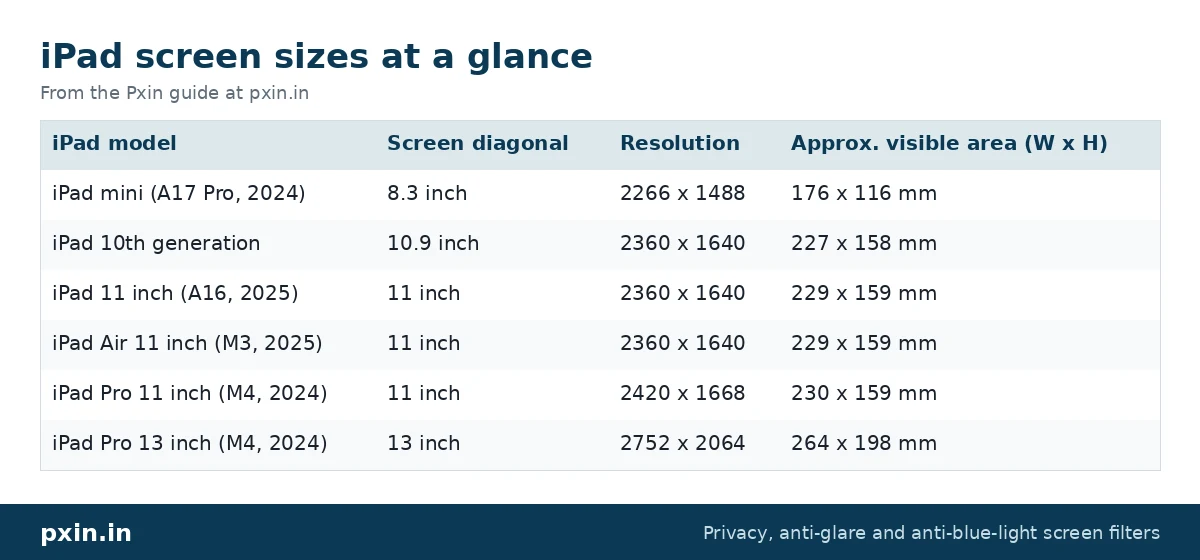
Notice how close the 11 inch models are. That is exactly why the model number matters more than the size.
2. Understand two-way privacy, and how rotation changes it
A privacy guard has micro-louvers built into the film: extremely fine slats that let light travel towards your eyes but stop it spreading sideways. Facing the iPad, you see a normal image. From beyond roughly 30 degrees to the side, the screen turns dark.
Our iPad guards use two-way privacy (blocks left and right views). The slats are fixed in the film, so when you rotate the iPad by 90 degrees, the blocked directions rotate with it. Held one way, people beside you see a dark screen. Turned the other way, the darkening is above and below you instead, and people beside you may see more.
So ask yourself how you hold the iPad when private content is on screen. If you mostly type in a keyboard case, the wide position is the one that matters. If you read documents held upright, check which orientation the guard is designed for before you choose.
3. Apple Pencil and touch
A privacy guard is a thin film, and the iPad's touchscreen and Apple Pencil work through it. The surface usually feels a little more matte than bare glass, which some people like for writing and others find different at first. If you draw or take notes heavily, give yourself a few days to get used to the feel.
4. Touch ID, Face ID and the camera
Check how you sign in to your iPad. On the iPad Air (M3) and iPad (A16), Touch ID sits in the top button, so a screen guard does not get in the way of the fingerprint sensor. On models with Face ID, such as the iPad Pro, make sure the guard leaves the front camera area clear, and test Face ID once the guard is fitted. If it struggles, re-enrol your face after fitting.
5. Brightness and screen look
Here is the honest limitation. Because a privacy guard blocks light at angles, the screen looks dimmer to you as well, and colours can look slightly muted. Most people simply raise brightness a step or two. Most of our privacy guards also have a matte anti-glare surface, which softens reflections from windows and lights, but can make very fine text look a touch softer than on bare glass.
If you mainly want to cut reflections and do not need privacy, an iPad anti-glare screen guard keeps the screen brighter. Our post on privacy screen vs anti-glare screen guard explains the trade-off.
6. Case compatibility
Folio cases, keyboard cases and rugged cases often wrap a little over the screen edges. A guard that reaches right to the edge can lift if the case presses on it. Fit the guard first, then put the case on carefully, and check that no corner is being pushed up.
7. Fitting it without bubbles
Most fitting problems come from dust. Before you start:
- Wash and dry your hands, and work in a room without a fan running.
- Clean the screen with the wipe or a soft microfibre cloth, then use a dust sticker on any specks.
- Line up the guard with the camera and edges before you press it down.
- Press from the centre outwards to push out air.
Our iPad and tablet privacy screen installation guide walks through each step with pictures.
Quick checklist before you buy
- Model number confirmed in Settings and matched on Apple's list.
- Guard listed for your exact model and year.
- Orientation you use most considered for two-way privacy.
- Pencil feel acceptable for how much you write or draw.
- Sign-in method checked (Touch ID button or Face ID camera clear).
- Case fit thought through.
Frequently asked questions
Does an iPad privacy screen guard work in both orientations?
A two-way guard blocks views in one direction pair. When you rotate the iPad, the blocked directions rotate too, so in one orientation the sides are dark and in the other the top and bottom are dark.
Does Apple Pencil work with an iPad privacy screen guard?
Yes, Apple Pencil works through a thin privacy film. The surface may feel more matte than bare glass, which changes the writing feel slightly.
Will a privacy screen guard make my iPad darker?
Yes, a little. The guard blocks angled light, so most people raise brightness slightly to get a comfortable view.
How do I know which iPad privacy screen guard fits my iPad?
Find the model number in Settings, then General, then About, and match it on Apple's identify your iPad page. Then choose the guard listed for that exact model.
Can I use Touch ID with a privacy screen guard?
On iPads with Touch ID in the top button, such as the iPad Air (M3) and iPad (A16), the guard does not cover the sensor, so Touch ID works as usual.
Find the right filter
Once you know your model number, browse our iPad privacy screen guard range and pick the guard listed for that exact iPad. If you use an Android tablet as well, our Samsung Galaxy Tab privacy screen guide covers those models.