Privacy Screen Buying Guide for Companies (Bulk Orders)
Last updated: October 2026
Quick answer: To order a bulk privacy screen for office use, first list every device by exact model, screen size and aspect ratio, then group them, choose a mount type for each group, and pilot with one team before ordering for everyone. Most wrong orders come from guessing sizes, so a simple device audit saves the most money and time.
IT and admin teams often come to us with a request like "we need 200 privacy filters". The first question we ask back is: for which screens? A company usually has several laptop models, two or three monitor sizes, and a few odd devices at reception or the billing desk. This guide walks through the planning steps that make a bulk order go smoothly.
Why companies buy privacy screens in bulk
Screens show customer records, salary sheets, contracts and code. In an open-plan office, a coworking space, a client site or a train, those screens are visible to people who should not see them. Reading a screen over someone's shoulder is called visual hacking.
In a 2015 study by the Ponemon Institute in US offices, 88% of attempts to collect sensitive information visually succeeded, 70% went unnoticed, and 53% of the exposed information came from screens. A summary is available on Help Net Security.
In India, the Digital Personal Data Protection Act 2023, section 8(5), requires data fiduciaries to take reasonable security safeguards to prevent personal data breaches. The Act does not mention screen filters. Filters can, however, be one practical safeguard for teams that handle personal data on screen, alongside access controls and training. This is not legal advice.
For more on everyday desk privacy, see our post on screen privacy at work.
Step 1: Audit your devices before you order
This is the step that decides whether the order fits. Ask each team, or pull from your IT asset register, the following for every device:
| Field to collect | Example entry | Why it matters |
|---|---|---|
| Device type | Laptop, monitor, MacBook, tablet, POS screen | Each type uses a different filter range |
| Exact model | Dell Latitude 5440, MacBook Air 13.6 inch M3 | Model decides size and fit details |
| Screen size (diagonal) | 14 inch | Filters are sized by diagonal and aspect ratio |
| Aspect ratio | 16:9 or 16:10 | Same diagonal, different shape |
| Touchscreen? | Yes or No | Touch screens need a touch-compatible film |
| Preferred mount | Adhesive tabs, slide-in, magnetic, hanging | Depends on how often the filter comes off |
| Team and location | Finance, Floor 3 | Helps with labelled packing and rollout |
| Quantity | 24 | Final count per size |
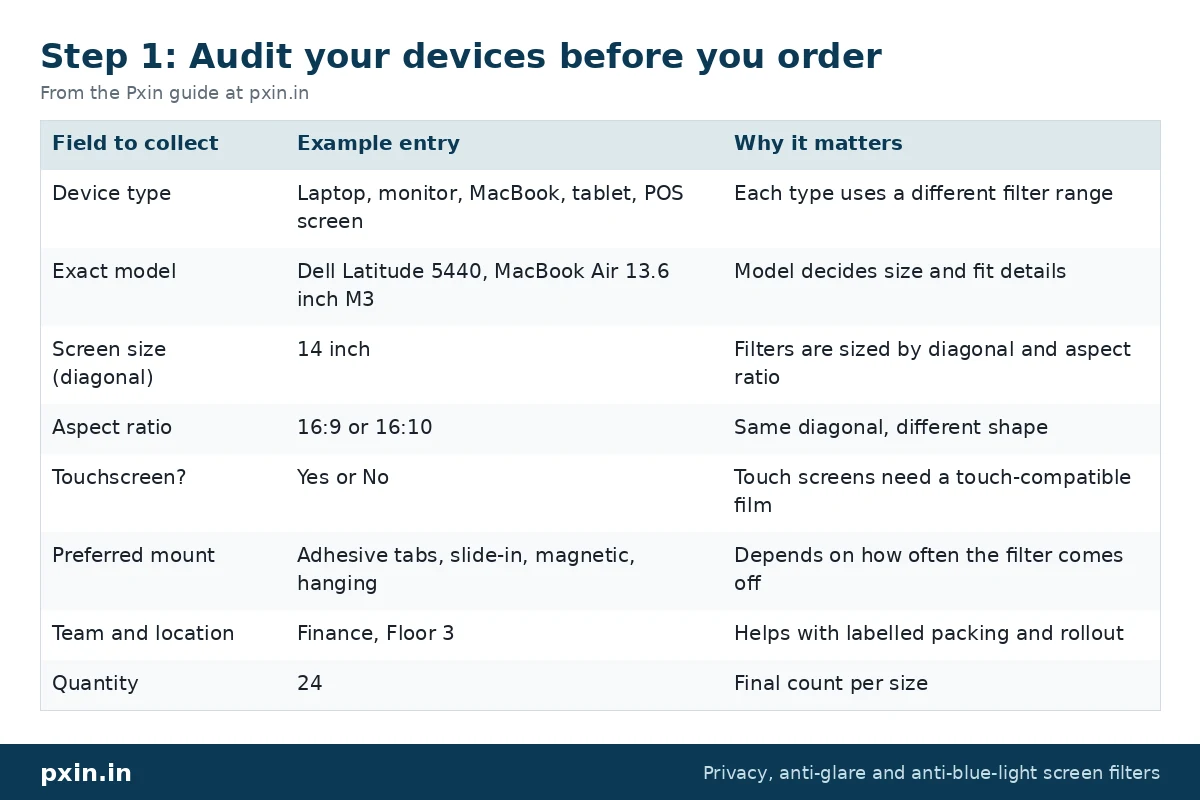
A 14 inch 16:9 laptop and a 14 inch 16:10 laptop need different filters. By our calculation, the 16:9 panel measures roughly 310 x 174 mm and the 16:10 panel roughly 302 x 188 mm. That 14 mm height difference is enough to leave a gap or hang over the bezel, which is why the aspect ratio column matters.
Where your register lacks screen details, the laptop model number usually leads to the maker's spec sheet. For Apple devices, the model name in About This Mac is enough.
Step 2: Group devices and choose filter types
Once the audit is in, group the rows by device type, size and aspect ratio. Most companies end up with a handful of groups covering the majority of devices, plus a short list of one-offs.
Then match each group to a range:
- Windows laptops: our laptop privacy screen guards are listed by diagonal and aspect ratio.
- MacBooks: use the MacBook privacy screen guards, which are listed by model rather than size alone.
- Desk monitors: see the monitor privacy screen guards, which include standard, wide and curved sizes.
- Tablets, POS screens and kiosks: these often need model-specific or custom-cut filters. Our POS, ATM and kiosk privacy filter guide explains how to measure them.
Keep the range name next to each group in your order sheet, so the supplier can check fit before packing.
Step 3: Pick mounts that match how people work
Mount choice affects whether people keep the filter on.
- People who move around (sales, consultants, managers) usually prefer magnetic or slide-in filters that come off quickly for presentations.
- Fixed desks handling sensitive data (finance, HR, payroll, customer support) suit adhesive tabs or hanging monitor filters that stay on all day.
- Shared or public screens (reception, billing counters) need fixed mounts so nobody walks off with the filter.
Step 4: Run a pilot with one team
Before ordering for the whole company, fit filters for one team of 10 to 20 people for two weeks. Ask them three questions at the end: does the screen feel private enough, is it bright and clear enough to work, and does the mount stay put?
The pilot also flags sizing errors in your audit while they are cheap to fix. Pxin's own customer survey on privacy filters and eye strain, a 2025 WhatsApp survey of 224 Pxin customers with a follow-up of 171 (a customer survey, not a national sample), found that 96% of follow-up respondents said their screen felt more private with a filter. Your own pilot will tell you how your teams feel.
Step 5: Place the order and plan the rollout
With a confirmed size list, prepare a single order sheet: size, aspect ratio, mount type, quantity and delivery location for each line. Ask your supplier to pack and label by team or floor so filters reach the right desks.
For the rollout:
- Share a short note telling staff why filters are being introduced.
- Include a link to the installation guide, or have IT fit them at a set time.
- Ask staff to raise the brightness a step if the screen looks dim.
- Keep a few spares of the most common sizes for new joiners and replacements.
- Add filter checks to your device onboarding list.
When you are ready, contact Pxin with your order sheet for a quote on bulk and custom sizes.
What a privacy filter cannot do
A filter blocks side views, roughly beyond 30 degrees each side. Someone standing directly behind a user still sees the screen. It also makes screens a little dimmer, and some users notice a slight grain from the matte surface. Pair filters with a clear-screen policy, screen lock timeouts and sensible desk placement.
Frequently asked questions
How do I find the right privacy screen size for many different laptops?
Collect the exact model of each laptop, then look up its screen diagonal and aspect ratio. Group identical sizes together and order per group, keeping one-off models on a separate list.
Can we order custom privacy filter sizes for office monitors or kiosks?
Yes. Custom filters are cut to the measured active area of the screen. Send width and height in millimetres and a photo of each unusual device.
Should office privacy filters be magnetic or adhesive?
Magnetic or slide-in filters suit staff who often remove the filter, such as for presentations. Adhesive and hanging filters suit fixed desks where the filter should stay on all day.
Does the DPDP Act require companies to use privacy screens?
No. The DPDP Act 2023 requires reasonable security safeguards to prevent personal data breaches but does not name screen filters. Filters can be one practical safeguard among several. This is not legal advice.
Will privacy filters affect employee productivity?
Most people adjust quickly, often by raising brightness a little. A short pilot with one team is the simplest way to check comfort before a full rollout.
Find the right filter
Start with your device audit, then match each group to the right range, starting with our laptop privacy screen guards for most office fleets. For mixed fleets, custom sizes or a single quote across sites, send your order sheet through our contact page.