Screen Privacy at Work: Protecting Data in Offices and Coworking Spaces
Last updated: October 2026
Quick answer: Screen privacy at work means making sure only the person using a screen can read it. In offices and coworking spaces, that usually takes three things together: placing desks and monitors so screens do not face walkways, fitting privacy filters on screens that show personal or confidential data, and building habits like locking the screen whenever you step away. No single step is enough on its own.
Offices have become more open. Rows of shared desks, hot-desking, glass meeting rooms and coworking spaces full of people from different companies all mean more eyes near your screen. Most of those people are not trying to snoop. But a salary sheet, a customer's phone number or a client proposal can be read in a few seconds by anyone walking past.
This guide covers where screens leak information at work, how privacy filters help, and a checklist you can use for your own desk or your whole team.
What is visual hacking, and how common is it?
Visual hacking is simply reading or photographing information off someone's screen or desk without permission. It needs no technical skill, only a clear line of sight.
The most widely cited study of it is still a 2015 study by the Ponemon Institute, run in real US offices. Researchers posing as temporary workers tried to collect sensitive information by walking around and looking. According to the visual hacking experiment findings, the researchers succeeded in 88% of attempts, employees failed to notice 70% of them, and screens were the source of 53% of what was exposed. It is an older study from another country, but the basic point still holds: a visible screen is an easy target.
Where screens leak data in offices and coworking spaces
Think about your workspace from the point of view of someone walking through it. Common weak spots include:
- Desks facing aisles. Anyone walking to the pantry or printer sees straight onto the monitor.
- Reception and front desks. Visitors stand right at the counter while staff look up records.
- Hot desks and shared tables. You may sit next to someone from another team, or another company.
- Glass meeting rooms. A shared screen or open laptop is visible from the corridor.
- Coworking lounges and phone booths. Laptops are used in open seating with strangers on all sides.
- Large monitors. A 27 inch or wider screen is readable from further away than a laptop.
HR, finance, payroll, sales and customer support teams usually handle the most sensitive data on screen, so start with them.
How privacy filters protect screen privacy at work
A privacy filter is a film whose micro-louvers, very fine built-in slats, let screen light out only in a forward direction. Facing it, you see your work as usual; a colleague sitting at more than roughly 30 degrees to your side gets a mostly black panel. On monitors, a filter can hang over the top edge, sit on with adhesive tabs or slide-in hasps, or attach with magnetic strips on some models.
For desk monitors, our monitor privacy screen guards cover most common sizes and aspect ratios. If people share a desk or need to switch the filter on and off, a magnetic monitor privacy screen is easy to take off and put back. For staff on laptops, see our laptop privacy screen guard range. The installation guide for laptops and monitors shows each mounting method step by step.
Our post on how to choose a monitor privacy filter for office work goes deeper into sizes and mounting types for desk setups.
The honest limitation: what a filter does not do
A privacy filter blocks angled views. It does not stop someone standing directly behind you, at your eye level, from seeing what you see. It also does nothing for a screen left open when you are away from your desk, papers left out, or a phone camera pointed straight at the monitor. Screens also look a little dimmer through a filter, so most people raise brightness slightly.
That is why a filter works as one layer of protection, not the whole answer.
Screen privacy at work: a desk and team checklist
| Check | What to do | Who owns it |
|---|---|---|
| Screen direction | Turn monitors away from aisles, doors and windows where possible | Facilities or the employee |
| Privacy filter | Fit filters on screens that show personal, financial or client data | IT or team lead |
| Lock on leave | Lock with Windows + L, or Control + Command + Q on a Mac, whenever you leave the desk | Every employee |
| Auto-lock | Set a short screen timeout and require a password to wake | IT |
| Clear desk | Put away printouts and notes with passwords or customer details | Every employee |
| Meeting rooms | Close shared screens and laptops before leaving the room | Meeting host |
| Visitors | Keep visitors in reception or escorted near sensitive teams | Admin or security |
| Coworking | Use a laptop filter and sit with your back to a wall when you can | Every employee |
| Review | Walk the floor every few months and look at screens from the aisle | Team lead |
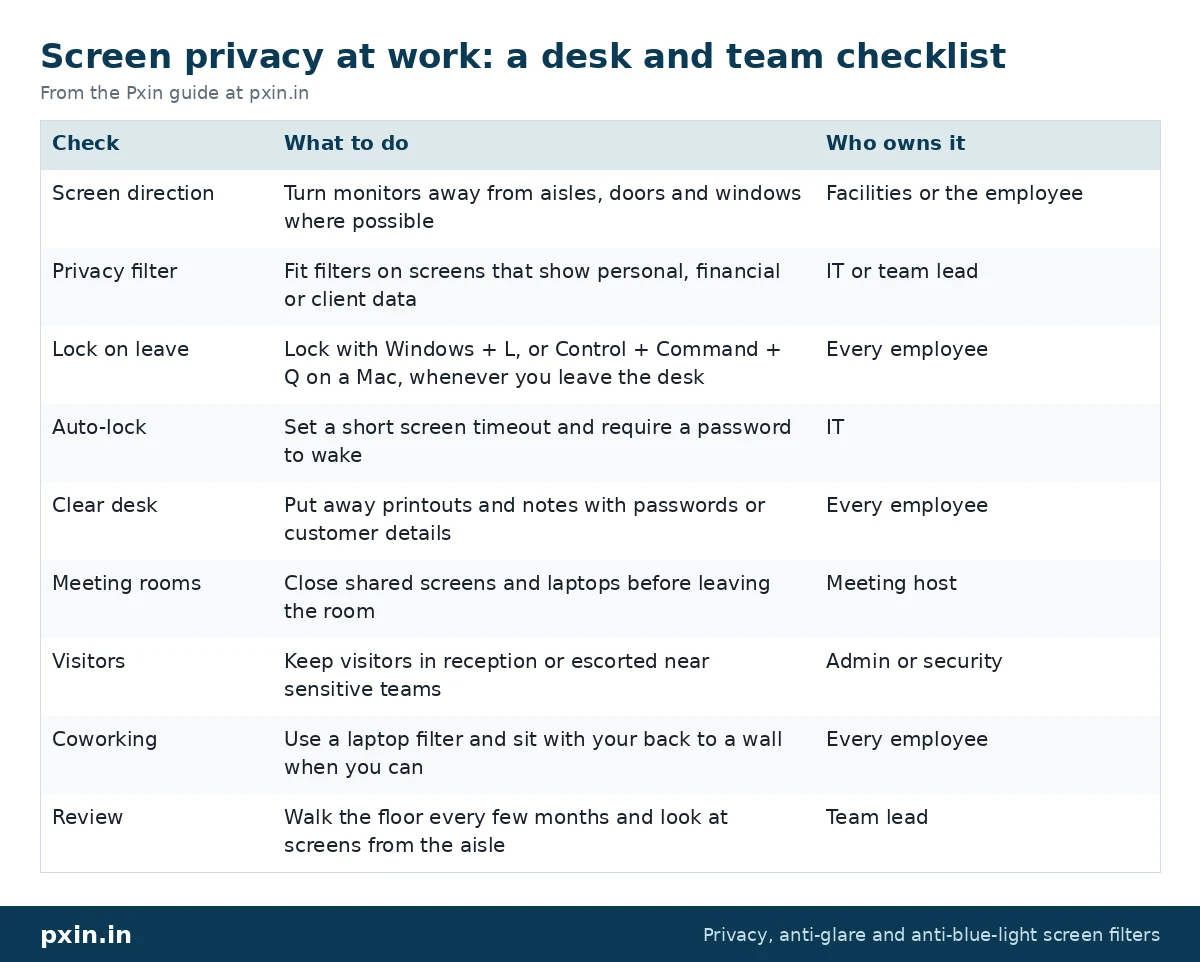
Doing this walk-through once is often eye-opening. Stand where a visitor would stand and look at what you can read.
Screen privacy in coworking spaces
Coworking spaces bring an extra twist: the people around you are not your colleagues. Some practical habits help:
- Pick seats against a wall or in a corner for sensitive work.
- Use a laptop privacy filter whenever you work in open seating.
- Book a closed cabin for calls or screens with client data.
- Turn off notification previews, so messages do not pop up on screen for everyone to read.
- Never leave a laptop open and logged in while you get coffee.
If your team uses a mix of laptops and monitors, it helps to standardise sizes and mounting types so filters can be swapped and replaced easily.
The DPDP Act and screen privacy at work
Under section 8(5) of India's Digital Personal Data Protection Act, 2023, data fiduciaries must put reasonable security safeguards in place to prevent personal data breaches. Screen filters are not named anywhere in the Act. Still, if your staff view customers' or employees' personal data on screen, reducing who can see those screens is one practical safeguard, alongside access controls, training and clear-screen rules. This is not legal advice. Speak to your legal or compliance team about what your organisation needs.
Rolling this out across a team
For a team or office, start small:
- List roles that see personal or confidential data on screen.
- Note each person's screen size and aspect ratio, and whether it is a laptop or monitor.
- Choose a mounting type that suits how they work, such as magnetic for hot desks.
- Fit filters, then do the floor walk-through again to confirm screens are dark from the aisle.
Our guide to privacy screens for bulk orders and companies covers sizing a mixed fleet. For custom sizes or larger orders, you can contact Pxin.
Frequently asked questions
Do I need a privacy screen for my work laptop?
If you handle personal, financial or client data and work in open offices, coworking spaces or while travelling, a privacy screen is a sensible, low-effort safeguard. If you work alone in a closed cabin, it matters much less.
Can someone behind me see my screen through a privacy filter?
Yes, a person directly behind you at your eye level can still see it. Filters block side views, so seating position and locking your screen still matter.
Does the DPDP Act require privacy filters?
No, the Act does not name privacy filters. What it asks for is reasonable security safeguards, and limiting who can see a screen is one practical way to support that. This is not legal advice.
What is a clear screen policy?
It is a workplace rule that screens are locked whenever unattended and that sensitive information is not left visible. Privacy filters support it, but locking the screen is the core of the policy.
Are privacy filters good for coworking spaces?
Yes, they are one of the simplest ways to keep strangers in open seating from reading your laptop. Pair them with a wall-facing seat and closed cabins for sensitive calls.
Find the right filter
For desk setups, start with our monitor privacy screen guards and match the size and aspect ratio to each screen. Pair the filters with the checklist above and screen privacy at work becomes a daily habit rather than a one-time purchase.