Privacy Filters for POS Terminals, ATMs and Kiosks: A Buyer's Guide
Last updated: October 2026
Quick answer: A POS terminal privacy screen is a film or panel cut to the active area of a billing, ATM or kiosk display that darkens the screen for anyone standing off to the side, while the person directly in front can still read it. It reduces side viewing of card details, PINs and customer records, works with most capacitive touchscreens when a touch-compatible film is used, and is ordered as a custom size from your measurements.
We get more questions every year from shops, clinics, banks and kiosk makers who have noticed that the screen facing their staff is also facing the queue. A privacy filter is one of the simplest physical fixes. This guide explains what it can do, what it cannot, and how to order one that fits.
Why do POS terminals and kiosks need a privacy screen?
At a billing counter, the screen often shows a customer's name, phone number, order history or the last digits of a card. At a pharmacy or clinic desk it may show medical details. At an ATM or self-service kiosk, the screen guides people through account and payment steps while others stand a short distance away.
Reading someone else's screen is called visual hacking or shoulder surfing. In a 2015 study by the Ponemon Institute, researchers tested this in US offices and found that 88% of attempts to collect sensitive information visually succeeded, 70% went unnoticed, and 53% of the exposed information came from screens. You can read a summary on Help Net Security. That study looked at offices, not shops, but the basic problem is the same anywhere a screen faces people who should not see it.
Customers notice this too. A visible filter tells people that their details are being treated with some care.
How does a POS or ATM privacy filter work?
A privacy filter contains micro-louvers, which are very fine vertical slats inside the film. They let light travel straight forward to the operator or user and block light heading sideways. Beyond roughly 30 degrees on each side, the screen appears dark.
For a counter, this means a cashier standing in front sees the screen normally, while a customer waiting at an angle sees a dark panel. For an ATM or kiosk, the person at the machine sees the screen, while someone standing to one side does not.
Most filters also have a matte finish, which cuts reflections from shop lighting and sunlight. That helps kiosks placed near entrances or windows.
Does a privacy filter work on a touchscreen POS terminal?
Yes, in most cases. Modern POS terminals and kiosks mostly use capacitive touchscreens, which sense your finger through a thin layer. A touch-compatible film is made thin enough for touch to keep working. Older resistive screens, which respond to pressure, also generally work through a thin film.
Two things to check before ordering:
- Does the device have a raised bezel? If the screen sits below the frame, the film needs to fit inside that recess exactly.
- Is there a card reader or camera near the screen edge? Note its position so the film does not cover it.
For a non-touch customer display or a back-office monitor, a hanging or adhesive filter like those in our monitor privacy screen guards range can also work.
How to measure a POS terminal privacy screen
Because POS, ATM and kiosk screens come in so many shapes, filters for them are usually cut to size. The key measurement is the active area, which is the part of the glass that lights up and shows the picture, not the outer frame.
- Turn the screen on with a white or bright background so the edges of the active area are easy to see.
- With a steel ruler, note how wide the glowing part of the screen is, in millimetres.
- Measure the height the same way.
- Note the diagonal size and aspect ratio if you know them, as a cross-check.
- Note whether the screen is flat to the frame or recessed, and how deep the recess is.
- Photograph the device straight on with a ruler held against the screen.
As a cross-check, you can calculate the expected active area from the diagonal. Width equals the diagonal times the width ratio divided by the square root of (width ratio squared plus height ratio squared), times 25.4 for millimetres. Here are some worked examples:
| Screen | Aspect ratio | Approx. active area (W x H) | Typical use |
|---|---|---|---|
| 10.1 inch | 16:10 | 218 x 136 mm | Handheld or countertop billing tablet |
| 15 inch | 4:3 | 305 x 229 mm | Older POS terminal, kiosk |
| 15.6 inch | 16:9 | 345 x 194 mm | Modern POS terminal |
| 21.5 inch | 16:9 | 476 x 268 mm | Self-service kiosk, order screen |
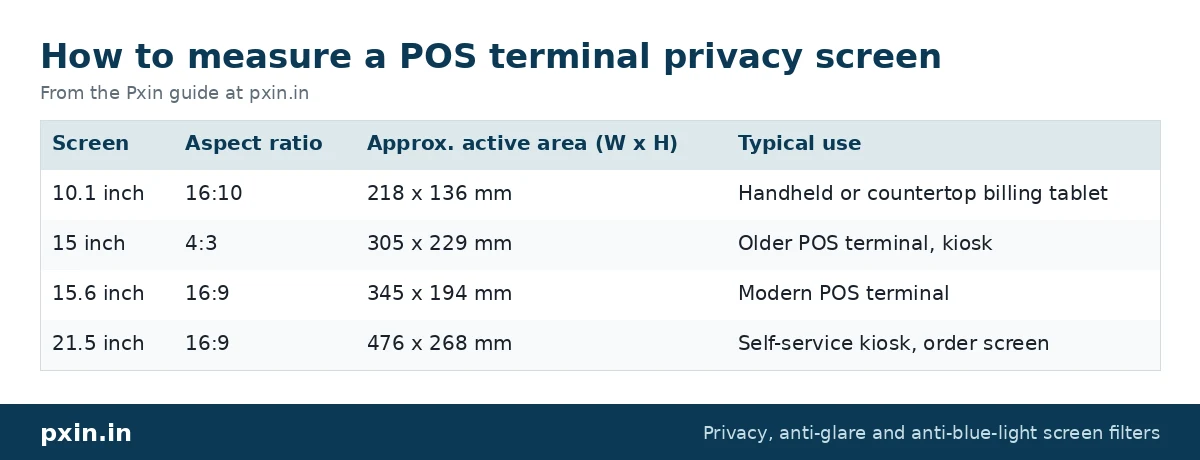
Real screens can differ by a few millimetres from these numbers, so always send your own measurements.
Mounting options for counters, ATMs and kiosks
The right mount depends on how the screen is used and who can reach it.
- Adhesive mount: The film sticks directly to the screen or to the bezel with clear adhesive. This is the usual choice for touchscreens and for public kiosks, where a loose filter could be removed or damaged.
- Frame mount: A frame holds the filter in place around the screen edge. It suits kiosks with deep bezels and machines that are serviced often.
- Hanging or tab mount: Common on back-office monitors where the filter may be taken off now and then.
For public-facing machines, choose a fixed mount. A filter held on by removable tabs is easy for a passer-by to lift off.
Our installation procedure guide shows how adhesive and slide-in mounts are fitted on monitors, and the same principles apply to counter screens.
What a privacy filter will not do
A filter reduces side viewing. It is not a full security system. The person standing directly behind the user, looking over their shoulder from the same angle, can still see the screen. That is why banks pair screen filters with PIN shields over the keypad, and why queue lines are usually kept a step back from the counter.
The filter also makes the screen a little dimmer. Indoor POS screens usually handle this with a small brightness increase, but a kiosk in strong sunlight may need its brightness set higher or a shade added.
Treat the filter as one layer alongside:
- PIN shields and keypad covers
- Screen positioning that faces away from queues and doorways
- A clear-screen policy, so staff lock or switch screens when stepping away
- Short session timeouts on kiosks
For a wider look at office and desk privacy, see our post on screen privacy at work.
Cleaning and care for POS privacy filters
Counter and kiosk screens are touched hundreds of times a day, so they get dirty fast. Clean with a soft microfibre cloth and a screen-safe cleaner sprayed onto the cloth, not onto the screen. Avoid harsh solvents, ammonia-based glass cleaners and rough paper towels, since they can damage the film coating.
Frequently asked questions
Do POS terminal privacy screens work with touchscreens?
Yes. A touch-compatible privacy film is thin enough for capacitive touch to work normally on most POS terminals and kiosks. If touch feels weaker, check that the film is pressed flat with no air gaps.
Can I get a privacy filter for a custom POS or kiosk screen size?
Yes. Custom filters are cut to the measured active area of your screen. Send the width and height of the lit area in millimetres, plus a photo of the device, when you ask for a quote.
Does an ATM privacy filter stop someone behind me seeing my PIN?
No. A privacy filter blocks views from the sides, not from directly behind. That is why it should be paired with a keypad shield and good queue spacing.
Will a privacy filter make my kiosk hard to read in sunlight?
It will reduce brightness slightly. The matte finish helps with glare, but kiosks in direct sun may need higher brightness settings or a shade over the screen.
How do I clean a privacy filter on a busy billing counter?
Use a soft microfibre cloth with a screen-safe cleaner applied to the cloth. Avoid harsh solvents and ammonia, and wipe gently in one direction.
Find the right filter
For custom POS, ATM and kiosk sizes, or for orders covering several branches, contact Pxin with your screen measurements and photos. If you are planning filters across a whole company, our bulk privacy screen buying guide for companies explains how to audit sizes before you order.