How to Clean and Care for Your Privacy Screen
Last updated: October 2026
Quick answer: To clean a privacy screen, switch off the device, remove loose dust with a dry microfibre cloth, then wipe gently with a cloth lightly dampened with water or a screen-safe cleaner sprayed onto the cloth, never onto the filter. Avoid alcohol-heavy sprays, ammonia glass cleaners, paper towels and pressing hard, because they can cloud the matte coating or scratch it.
Customers often ask us why their privacy filter looks smudged so quickly, or whether the cleaner they use on their glasses is safe for it. A privacy filter needs a little more care than bare glass because of how it is built. The good news is that the right routine takes under a minute.
Why a privacy screen needs gentle cleaning
A privacy filter is made of thin layers of plastic film. Inside are micro-louvers, tiny vertical slats that let light go straight forward and block it at the sides. On the outside, most filters have a matte anti-glare surface, which is a finely textured coating that scatters reflections.
That matte surface is what makes cleaning different. Its texture holds onto skin oil and fingerprints more visibly than smooth glass, and harsh chemicals can soften or strip the coating, leaving shiny patches or a cloudy haze. Rough cloths or paper can leave fine scratches that catch the light.
The louvers themselves are sealed inside the film, so you cannot damage them by wiping. You can, however, damage the surface above them.
What you need to clean a privacy filter
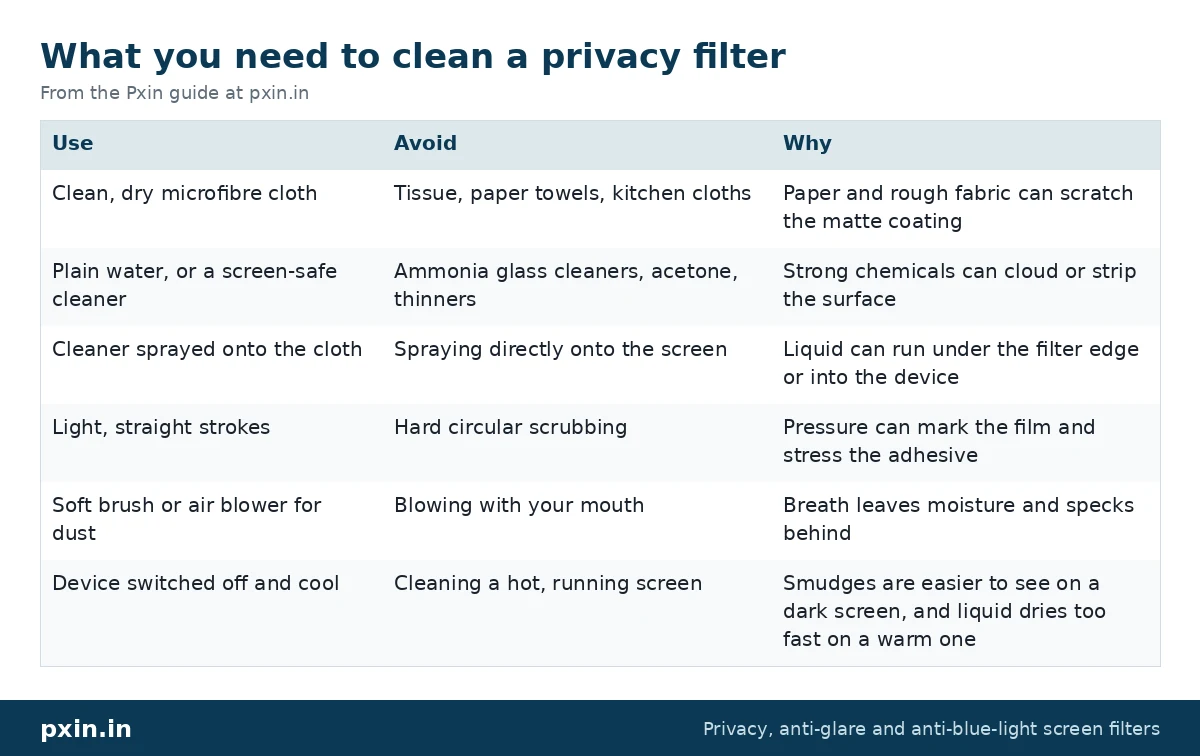
You do not need special kits. These simple items are enough:
| Use | Avoid | Why |
|---|---|---|
| Clean, dry microfibre cloth | Tissue, paper towels, kitchen cloths | Paper and rough fabric can scratch the matte coating |
| Plain water, or a screen-safe cleaner | Ammonia glass cleaners, acetone, thinners | Strong chemicals can cloud or strip the surface |
| Cleaner sprayed onto the cloth | Spraying directly onto the screen | Liquid can run under the filter edge or into the device |
| Light, straight strokes | Hard circular scrubbing | Pressure can mark the film and stress the adhesive |
| Soft brush or air blower for dust | Blowing with your mouth | Breath leaves moisture and specks behind |
| Device switched off and cool | Cleaning a hot, running screen | Smudges are easier to see on a dark screen, and liquid dries too fast on a warm one |
Keep one microfibre cloth just for screens, and wash it now and then without fabric softener, which leaves a film that smears.
How to clean privacy screen filters step by step
- Switch off or sleep the device. A dark screen shows every smudge and dust speck, and it avoids accidental clicks on a touchscreen.
- Remove loose dust first. Use a dry microfibre cloth, a soft brush or an air blower. Wiping a dusty screen with a wet cloth turns dust into grit.
- Dampen the cloth, not the screen. A light mist of water or screen-safe cleaner on the cloth is plenty. The cloth should feel barely damp.
- Wipe in straight lines. Go top to bottom or side to side with light pressure. Turn the cloth to a clean section as you go.
- Dry with a second dry cloth. This removes streaks from the matte surface.
- Check from the front and the side. Smudges sometimes show more at an angle.
For stubborn fingerprints, repeat steps 3 to 5 rather than pressing harder.
How to clean a removable or magnetic privacy filter
Removable filters, such as magnetic or slide-in types, can be cleaned on or off the screen. Taking them off gives better access and lets you clean the screen underneath too, which matters because any dust trapped between filter and display shows up as small bright spots.
Lay the filter flat on a clean cloth, clean the outer side, then turn it over and clean the inner side gently. Clean the laptop display as well, then refit the filter. Our magnetic privacy screen installation guide shows how to line it up again so the magnets sit correctly.
On a MacBook, check the edges after refitting. Apple explains that very little space separates a closed MacBook display from its keyboard, so anything left on the screen can harm it as the lid shuts. See its MacBook display care page. Never close the lid on a cloth or a filter that is out of position.
How to clean an adhesive or hanging monitor filter
Adhesive filters stay on the screen, so clean them in place. Be careful near the edges and tabs: too much liquid can seep under and weaken the adhesive. If an edge starts to lift, press it down with a dry cloth rather than wetting it more.
Hanging filters on monitors can be lifted off the top tabs and cleaned flat on a table. Hold them by the edges to avoid adding fresh fingerprints. Our installation procedure guide covers how tabs and slide-in mounts sit, which also helps when refitting after cleaning.
Storing a privacy filter you are not using
If you take your filter off for a while, store it flat in the sleeve or pouch it came in. Bending or rolling the film can leave a permanent curve that makes it sit badly on the screen. Keep it away from heat, such as a car dashboard or a sunny windowsill, and do not stack heavy books on it.
Before refitting a stored filter, clean both sides and the screen, since dust settles even inside a pouch.
What cleaning cannot fix
Cleaning removes oil, dust and smudges. It cannot repair a scratch. Fine scratches in the matte coating are permanent, and no polish or paste will remove them safely. Small scratches rarely affect the privacy effect because the louvers sit deeper in the film, but if the filter is badly scratched or the coating has gone cloudy, replacement is the practical answer.
Some people also notice that a clean filter still looks slightly grainy on white backgrounds. That is the matte texture doing its job against glare, not dirt, and cleaning will not change it. Our post on whether a privacy screen reduces brightness explains why filters look a little dimmer and how to adjust for it.
Frequently asked questions
Can I use alcohol wipes to clean a privacy screen?
It is safer to avoid strong alcohol wipes on a privacy filter, since they can dry out or cloud the matte coating over time. Plain water on a microfibre cloth removes most smudges, and a screen-safe cleaner handles oily marks.
Why does my privacy screen look cloudy after cleaning?
Cloudiness usually comes from cleaner residue left on the matte surface. Wipe again with a cloth lightly dampened with plain water, then dry with a clean cloth. If the haze remains, the coating may have been damaged by a harsh chemical.
How often should I clean my privacy filter?
Wipe off dust whenever you notice it, and give it a damp clean about once a week with daily use. Touchscreens and shared counter screens may need a quick wipe every day.
Can I clean the screen under an adhesive privacy filter?
Not without lifting the filter, which can weaken the adhesive. Clean the display carefully before you install an adhesive filter, since that is the only easy chance to get it spotless.
Will cleaning remove the anti-glare effect?
Gentle cleaning with water or a screen-safe cleaner will not remove it. Harsh solvents and abrasive cloths can wear the matte coating, which reduces the anti-glare effect.
Find the right filter
If your current filter is scratched or cloudy beyond cleaning, a replacement in the right size is the simplest fix. Browse our laptop privacy screen guards or monitor privacy screen guards, and when the new filter arrives, our guide on how to install a laptop privacy filter will help you fit it cleanly.