Working on a Train or Flight? Keep Your Laptop Screen Private
Last updated: October 2026
Quick answer: A laptop privacy screen for travel darkens your display for people beside you, so the passenger in the next seat on a train or flight cannot read your work. For travel, a magnetic or easily removable filter is usually the most practical, because you can take it off when you are alone and put it back in seconds. Pair it with a few habits, such as choosing a window seat and locking your screen, because no filter blocks someone looking straight over your shoulder.
Long train rides and flights are good times to clear your inbox or finish a presentation. They are also some of the most crowded places you will ever open a laptop. On a full chair car or an economy row, the person next to you sits close enough to read your screen without even trying.
This guide covers where your screen is most exposed when you travel, how to pick a filter that suits life on the move, and the small habits that make the biggest difference.
Why your screen is so exposed when you travel
At an office, colleagues mostly mind their own work. On the move, you are surrounded by strangers with time on their hands, and screens are the most interesting thing in sight.
- Seats are close. On trains and planes, the next passenger's eyes are often less than an arm's length from your screen.
- Journeys are long. A few hours beside someone gives them plenty of time to read emails, figures or chats.
- People walk past. Aisles, boarding queues and food service bring a steady stream of people looking down at laps.
- Lounges and gates are open. Airport seating rows and station waiting halls put screens in view from several directions.
- You may not notice. When you are focused, a quiet glance from the side is easy to miss.
In a 2025 WhatsApp survey of 224 Pxin customers, with a follow-up of 171 (a customer survey, not a national sample), 90% of follow-up respondents said they feel more confident working in public with a filter, and 65% said shoulder surfing bothers them less. These are customers' own views, not a lab test, but they match why most people buy a filter for travel.
How a laptop privacy screen for travel works
Inside the film sit micro-louvers: rows of microscopic slats, like a venetian blind turned on its side, which pass light towards you and stop it heading sideways. From your seat you see the screen normally. From the next seat, past roughly 30 degrees, the screen looks dark.
A standard two-way filter blocks left and right, which covers the passenger next to you. A 360 filter also darkens views from above, which helps in aisle seats where people walk past and look down. Our post on 360 vs 2-way privacy screens explains that choice in detail.
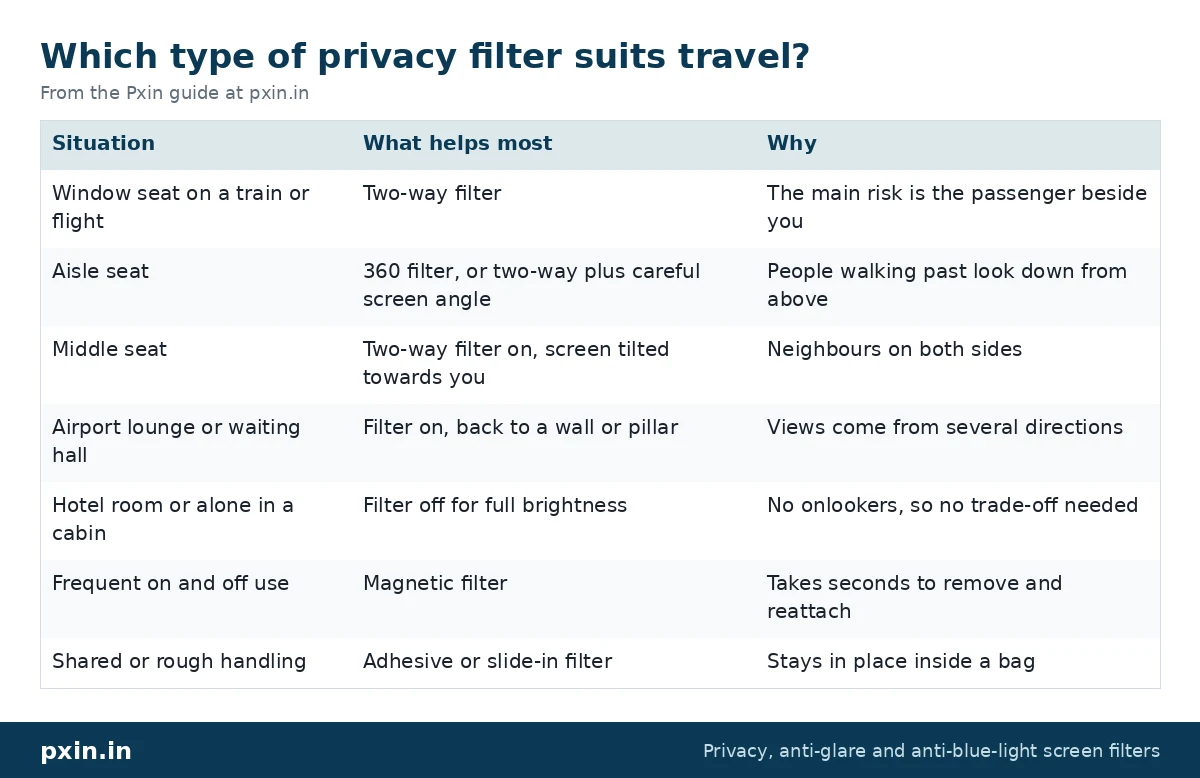
Which type of privacy filter suits travel?
| Situation | What helps most | Why |
|---|---|---|
| Window seat on a train or flight | Two-way filter | The main risk is the passenger beside you |
| Aisle seat | 360 filter, or two-way plus careful screen angle | People walking past look down from above |
| Middle seat | Two-way filter on, screen tilted towards you | Neighbours on both sides |
| Airport lounge or waiting hall | Filter on, back to a wall or pillar | Views come from several directions |
| Hotel room or alone in a cabin | Filter off for full brightness | No onlookers, so no trade-off needed |
| Frequent on and off use | Magnetic filter | Takes seconds to remove and reattach |
| Shared or rough handling | Adhesive or slide-in filter | Stays in place inside a bag |
For most travellers, a magnetic laptop privacy screen is the easiest to live with. You fit it in a crowded carriage and take it off in your hotel room. Fitting is simple; the magnetic privacy screen installation guide walks through it for both Windows laptops and MacBooks. If you prefer a filter that stays put, our regular laptop privacy screen guard range uses adhesive tabs or slide-in hasps.
MacBook travellers: check before you close the lid
If you use a MacBook, there is one extra point. Apple points out that a MacBook closes with only a very small clearance between screen and keyboard. In its guidance on closing a MacBook with a cover, Apple says not to use a cover over the camera area that is thicker than 0.1 mm, and cautions that anything left on the display when you shut the lid can damage the screen.
So, on a train or plane, remove a magnetic filter or check it sits correctly before you shut the lid in a hurry for a meal tray or landing. Our MacBook privacy screen guard category lists filters by model, and our post on MacBook magnetic vs adhesive privacy screens helps you choose the right style.
The honest limitation
A privacy filter only blocks angled views. Someone sitting directly behind you, roughly in line with your eyes, can still see your screen. In some aircraft and train layouts, a passenger behind can see over your seat between the headrests. Your screen will also look a little dimmer with the filter on, so you will likely raise brightness a step, which uses a bit more battery on long journeys.
Travel habits that close the remaining gaps
- Choose a window seat for focused work when you can. It removes one side entirely.
- Tilt the screen slightly towards yourself so it faces your eyes squarely.
- Lock the screen every time you get up, even for a minute. Use Windows + L, or Control + Command + Q on a Mac.
- Hide notification previews so private messages do not pop up for your neighbour.
- Save sensitive work for later. Salary data, legal documents and customer lists can often wait for a private room.
- Watch what you say on calls. A privacy filter protects your screen, not your voice.
- Use your own hotspot rather than open station or airport Wi-Fi for work accounts.
Get the size right before you travel
A filter that is the wrong size will leave gaps at the edges or will not attach properly. Measure the visible screen area and check your aspect ratio, usually 16:9 or 16:10 on laptops. For example, the visible area of a 14 inch 16:10 laptop works out to roughly 302 x 188 mm, and a 15.6 inch 16:9 laptop to roughly 345 x 194 mm. Measure across the lit display only, not the bezel.
Frequently asked questions
Is a privacy screen worth it for travel?
If you work on trains, flights or in lounges, it is one of the simplest ways to stop your neighbour reading your screen. It costs you a little brightness, which most people offset by raising the screen brightness a step.
Can the person next to me on a plane see my laptop with a privacy filter?
From a side seat, the screen should look dark beyond roughly 30 degrees. A person looking from directly behind, in line with your eyes, can still see it, so seat choice still helps.
Which privacy screen is easiest to use while travelling?
A magnetic filter is usually the easiest, because it comes off and goes back on in seconds. Adhesive or slide-in filters stay fixed, which suits people who keep them on all the time.
Can I close my MacBook with a privacy screen on?
Apple says the space between a closed MacBook's screen and keyboard is very small. Remove a magnetic filter, or check that it sits correctly, before you close the lid.
Does a privacy filter drain my laptop battery faster?
The filter itself uses no power. You may raise brightness slightly to compensate for the dimmer view, and that can use a little more battery over a long trip.
Find the right filter
For travel, start with our magnetic laptop privacy screen range so you can switch privacy on and off as your seat changes, and match the size and aspect ratio to your laptop before your next trip.