Types of Privacy Screen Filters: A Complete Guide (Laptops, Monitors, Tablets and POS)
Last updated: October 2026
Quick answer: The main types of privacy screen filters are two-way laptop filters, magnetic filters, touch-compatible filters, 360 (four-way) filters, monitor filters (including curved, ultrawide and iMac), tablet and iPad screen guards, and custom filters for POS terminals, ATMs and kiosks. They differ in which directions they block, how they attach and whether they work with touch. Anti-glare and anti-blue-light guards look similar but do not add privacy.
Customers often ask us which privacy filter they need. The answer depends on three things: the device, where onlookers usually are, and how often you want to take the filter off. This guide covers every type of privacy screen filter we make at Pxin, how each works, who it suits, and one trade-off to know before you choose.
How privacy screen filters work
Every privacy filter here uses the same idea. The film contains very fine slats called micro-louvers, like tiny window blinds. Light travelling straight towards your eyes passes between the slats; light leaving at a steep angle is blocked. To you the screen looks normal, while to someone at the side it looks dark. On a typical filter, the side view goes dark beyond roughly 30 degrees each side.
Our privacy filters also work as a three-in-one layer: the same sheet has a matte surface that cuts glare, and it reduces blue light. Be realistic about that last part. A 2023 Cochrane review found blue-light-filtering lenses showed little or no short-term benefit for eye strain, so treat it as a comfort extra, not a medical fix.
The types differ in direction (two-way or 360), attachment (adhesive tabs, slide-in hasps, magnets, hanging or frame mounts) and surface (standard or touch-compatible).
1. Two-way laptop privacy filters
How it works: The micro-louvers run in one direction, so the screen goes dark for people on your left and right, like the next seat on a train or the next desk.
How it attaches: Small clear adhesive tabs hold the filter on the screen, or slide-in hasps stuck to the bezel let you lift the filter out when you want to share your screen.
Who it suits: People working from home, cafes, libraries and offices where colleagues sit beside them. It is the natural starting point.
Pros: The brightest privacy option, forgiving of posture, and made in both 16:9 and 16:10 shapes.
Honest limitation: It does nothing for people looking down from above, such as someone standing behind your chair.
See the size range in our laptop privacy screen guard category.
2. Magnetic privacy filters for Windows laptops and MacBooks
How it works: Same privacy film, different hold. The filter clings to the frame around the display or to thin magnetic strips you stick on the bezel once. It snaps on and off in a second and leaves nothing on the screen.
Who it suits: People who remove the filter often for video calls, presentations or sharing, and MacBook owners who close the lid many times a day.
Pros: Fast on and off, no residue, easy to carry.
Honest limitation: MacBooks close with very little space between screen and keyboard. Apple warns that closing a Mac laptop with a camera cover thicker than 0.1 mm on it might damage the display (Apple support). We apply the same caution to filters: take a magnetic filter off, or check it is perfectly flat, before shutting the lid.
Browse magnetic laptop privacy screens for Windows laptops, or MacBook magnetic privacy screens for MacBook Air and MacBook Pro.
3. Touch-compatible privacy filters
How it works: The filter uses a film made for touchscreens and is applied flat to the glass, so taps and swipes still register. It works with most capacitive touchscreens when there are no air pockets.
Who it suits: Owners of touchscreen Windows laptops, 2-in-1 convertibles and Microsoft Surface devices.
Pros: Privacy, glare control and touch in one layer.
Honest limitation: It is meant to stay on, not to be lifted off and replaced several times a day.
Find your size in the touch laptop privacy screen guard category, with fitting tips in our post on privacy screens for touch laptops.
4. 360 degree (four-way) privacy filters for laptops and monitors
How it works: A 360 filter darkens the screen from the left and right, and also from above and below. Because it blocks on all four sides, it keeps working whether a 2-in-1 sits in its usual wide position or is turned upright.
Who it suits: Open-plan offices, reception desks, aisle seats, desks facing a walkway, convertible laptops, and anyone handling salary sheets or client files.
Pros: Covers the angles a two-way filter leaves open, especially people standing and glancing down.
Honest limitation: It looks a little darker than a two-way filter, and the comfortable zone is narrower up and down. Tilt the lid so the screen faces you squarely.
360 filters are for laptops and monitors only; our tablet guards use two-way privacy. See the 360 laptop privacy screen range, and our comparison of 360 vs 2-way privacy screens.
5. Monitor privacy filters: standard, magnetic, curved, ultrawide and iMac
Monitors come in more shapes than laptops, so the filters do too:
- Standard flat filters in 16:9 and 16:10, fixed with adhesive tabs, slide-in hasps or hung from the top edge. Hanging and slide-in mounts suit shared desks.
- Magnetic filters that snap on and off for people who switch between private work and sharing.
- Curved filters shaped to the panel, because a flat sheet lifts at the edges.
- Ultrawide filters for 21:9 and 32:9 screens on trading, data and design desks.
- iMac filters sized for the iMac display.
Who it suits: Finance, HR, healthcare, legal and customer service desks, and monitors facing a corridor.
Pros: A wide choice of mounts to match how the desk is used.
Honest limitation: The narrower viewing zone makes it awkward on screens two people read together, such as a sales desk with the customer beside the agent. A filter that lifts off solves that.
Start with the monitor privacy screen guard category.
6. Anti-glare and anti-blue-light screen guards (no privacy)
How it works: A matte film without micro-louvers. It diffuses reflections and reduces blue light, but everyone around you can still see the screen.
Who it suits: Students, home users and anyone working near windows who wants less glare without privacy. We make these for Windows laptops, MacBooks, monitors and touch devices.
Pros: Brighter than any privacy filter, wide viewing angles for sharing.
Honest limitation: Matte film adds a very slight grain, most noticeable on white backgrounds at first.
See the laptop anti-glare screen guard range, and our post on privacy screen vs anti-glare screen guard if you are unsure which problem you have.
7. iPad and tablet screen guards
Tablets have two filter types:
- Two-way privacy guards (blocks left and right views) for iPad, Samsung Galaxy Tab, Lenovo, Xiaomi, Redmi and OnePlus tablets, which also cut glare and reduce blue light.
- Anti-glare matte guards with no privacy, for a less reflective surface.
Who it suits: People who read reports, handle client or patient details, or take notes in meetings, clinics and classrooms.
Pros: Applied flat to the glass, so touch keeps working and the screen surface is protected.
Honest limitation: When you rotate the tablet from wide to upright, the blocked directions turn with it, so privacy suits the orientation you use most.
See the iPad privacy screen guard range.
8. Privacy filters for POS terminals, ATMs, kiosks and custom displays
How it works: The same micro-louver film is cut to the active area of a billing terminal, ATM or kiosk. It reduces side viewing of card details, PINs and customer data, while the person in front can still read the screen. Frame or adhesive mounts hold it, and a touch-compatible film works with most capacitive touchscreens.
Who it suits: Retail counters, banks, pharmacies, hospital reception, ticketing kiosks, and industrial or medical displays in non-standard sizes.
Pros: Cut to your measured size, so it covers the active area without overlapping buttons.
Honest limitation: A filter is one layer, not a full security plan. Use it alongside PIN shields, sensible screen positioning and clear-screen policies.
For custom sizes and bulk orders, share your measurements through the Pxin contact page. Our POS, ATM and kiosk privacy filter guide explains how to measure.
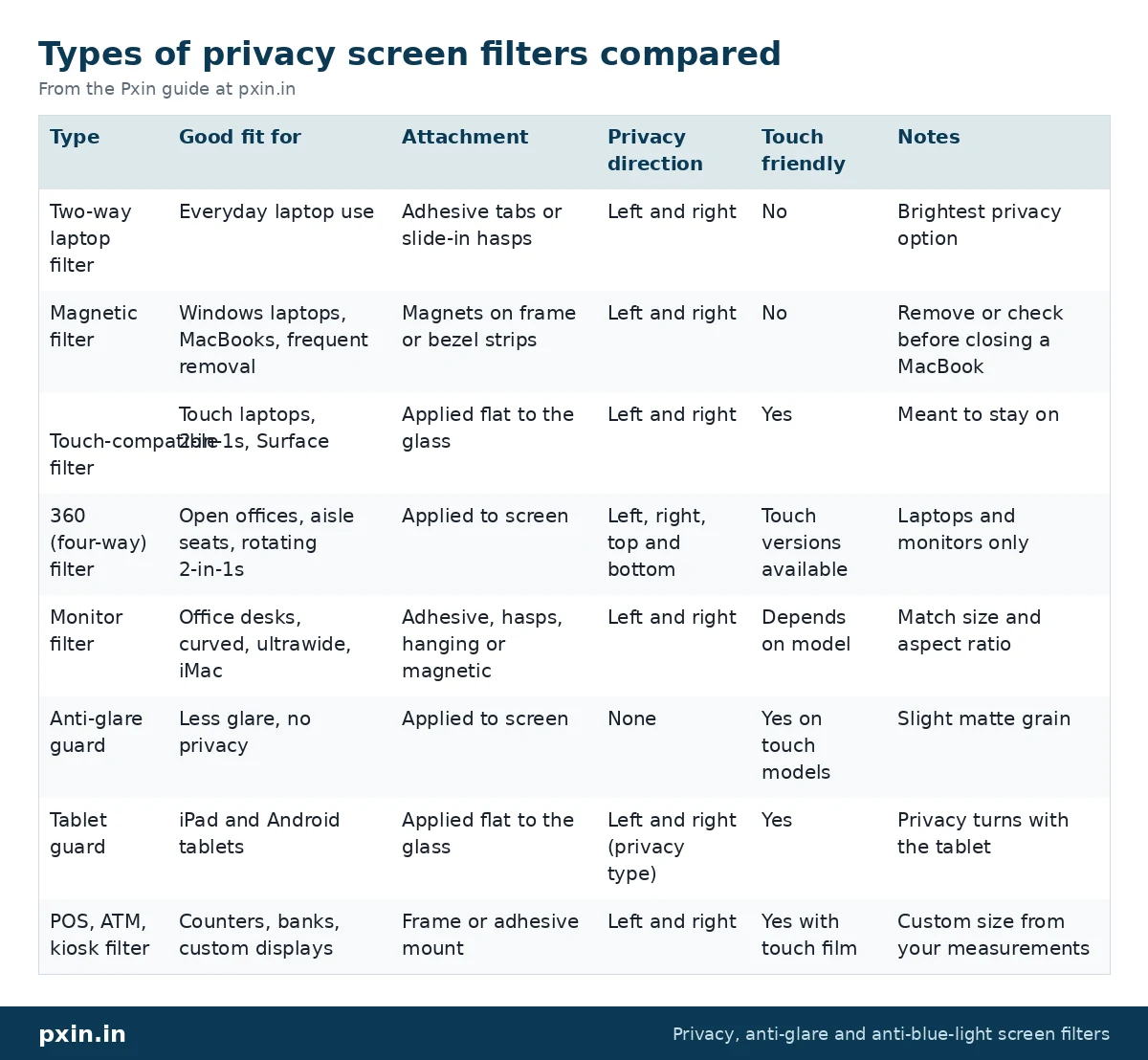
Types of privacy screen filters compared
| Type | Good fit for | Attachment | Privacy direction | Touch friendly | Notes |
|---|---|---|---|---|---|
| Two-way laptop filter | Everyday laptop use | Adhesive tabs or slide-in hasps | Left and right | No | Brightest privacy option |
| Magnetic filter | Windows laptops, MacBooks, frequent removal | Magnets on frame or bezel strips | Left and right | No | Remove or check before closing a MacBook |
| Touch-compatible filter | Touch laptops, 2-in-1s, Surface | Applied flat to the glass | Left and right | Yes | Meant to stay on |
| 360 (four-way) filter | Open offices, aisle seats, rotating 2-in-1s | Applied to screen | Left, right, top and bottom | Touch versions available | Laptops and monitors only |
| Monitor filter | Office desks, curved, ultrawide, iMac | Adhesive, hasps, hanging or magnetic | Left and right | Depends on model | Match size and aspect ratio |
| Anti-glare guard | Less glare, no privacy | Applied to screen | None | Yes on touch models | Slight matte grain |
| Tablet guard | iPad and Android tablets | Applied flat to the glass | Left and right (privacy type) | Yes | Privacy turns with the tablet |
| POS, ATM, kiosk filter | Counters, banks, custom displays | Frame or adhesive mount | Left and right | Yes with touch film | Custom size from your measurements |
No privacy filter hides your screen from someone directly behind you at your eye level, because they look through the same viewing window as you.
How to choose in 3 questions
1. What device is it for? Laptop, MacBook, monitor, tablet or counter terminal. Then find the exact diagonal and aspect ratio, measuring the visible display area, not the outer frame.
2. Where are the onlookers? Mostly beside you: two-way. Standing behind you or walking past: 360 on a laptop or monitor. No privacy needed, just less glare: anti-glare.
3. How often will you take it off? Rarely: adhesive or touch-compatible. Several times a day: magnetic, or slide-in hasps on a monitor. Never, on a fixed counter screen: a custom POS or kiosk filter.
Every privacy type makes the screen look dimmer, so most people raise brightness slightly.
Why screen privacy matters
In a 2015 study by the Ponemon Institute in US offices, 88% of visual hacking attempts succeeded and 70% went unnoticed. In our 2025 WhatsApp survey of 224 Pxin customers, with a follow-up of 171 (a customer survey, not a national sample), 96% of the follow-up group said the screen feels more private with a filter. Details are in our eye strain research report.
Frequently asked questions
What are the different types of privacy screens?
The main types are two-way, magnetic, touch-compatible and 360 (four-way) filters, monitor filters including curved, ultrawide and iMac versions, tablet privacy guards, and custom filters for POS terminals, ATMs and kiosks. Anti-glare guards look similar but do not block side views.
Which privacy filter should I get for a MacBook?
If you close the lid often or share your screen, a magnetic MacBook filter suits most people because it comes off in a second. Whatever the type, check it is flat or removed before closing the lid, and match your exact model, such as MacBook Air 13.6 inch.
Is a 360 privacy screen better than 2-way?
Neither is better in every case. A 360 filter also blocks views from above and below, while a two-way filter stays a little brighter and is more forgiving of posture. Choose based on where onlookers usually are.
Do privacy filters work on touchscreens?
Yes, when the filter uses a touch-compatible film applied flat to the glass. A standard filter mounted with tabs or hasps is not designed for touch.
What is the difference between a privacy filter and an anti-glare screen?
A privacy filter uses micro-louvers to darken the screen for people at the side, and ours also cut glare and reduce blue light. An anti-glare screen is a matte film that reduces reflections but leaves the screen visible to everyone.
Can I get a privacy filter in a custom size?
Yes. Filters for POS terminals, ATMs, kiosks and industrial or medical displays can be cut to the measured active area. Share your measurements and display model through our contact page.
Find the right filter
Start with the device. Our laptop privacy screen guard range covers most everyday needs, the monitor privacy screen guard range covers desks, and anything non-standard can be made to size through the contact page.